Back to Projects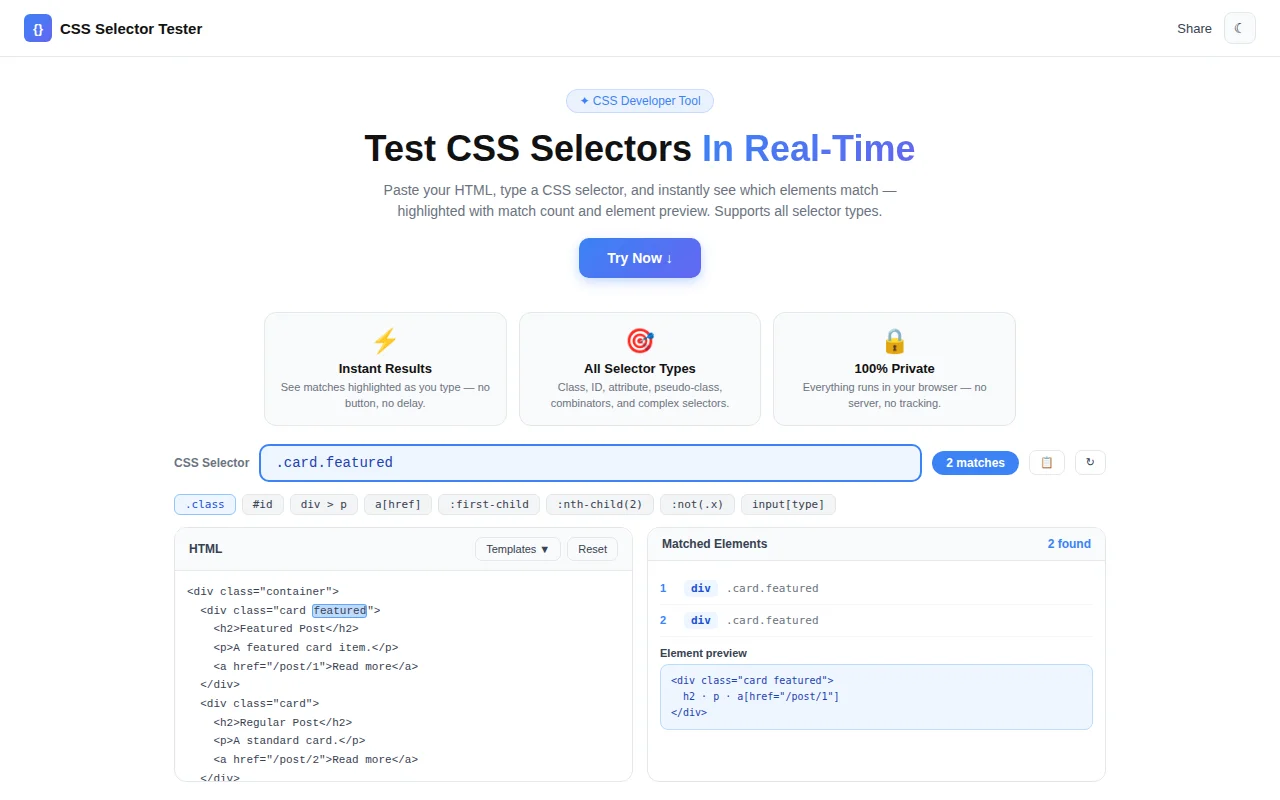
Developer Tools
CSS Selector Tester
A free, browser-based tool that lets developers test any CSS selector against custom HTML and instantly see which elements match — highlighted in real-time with match count and element preview.
CSSSelectorsDeveloper ToolsFrontendDebuggingNext.jsTypeScript
Start Similar ProjectAbout the Project
CSS Selector Tester — Test & Debug CSS Selectors in Real-Time
CSS Selector Tester is a free, browser-based tool that lets frontend developers write CSS selectors, test them against custom HTML, and instantly see which elements match — highlighted in the HTML preview with match count and element metadata. No login, no install, 100% in the browser.
The Problem
Writing CSS selectors is deceptively simple — until you're debugging why .nav > a:not(.active) isn't matching what you think it should. The browser DevTools help, but the iteration loop is slow: open DevTools, switch to the Console tab, type document.querySelectorAll('.your-selector'), read the NodeList, adjust, repeat.
For complex selectors — combinator chains, attribute selectors, nth-child patterns — that loop adds up fast. Developers need a faster way to validate selectors before embedding them in stylesheets or JavaScript queries.
How It Works
1. Paste Your HTML
Enter any HTML markup in the left editor panel. You can paste a component snippet, a page section, or a complete document fragment. The tool includes four sample templates — Navigation, Article, Form, and Cards — to get started instantly without writing HTML from scratch.
2. Type a Selector
Enter any CSS selector in the input field. The tool uses the browser's native querySelectorAll() engine, so the same rules that apply in real CSS and JavaScript apply here. All selector types work:
- Class selectors —
.card,.active,.btn-primary - ID selectors —
#email,#login-form - Element selectors —
div,li,input - Attribute selectors —
[type="email"],[data-category],[href^="#"] - Pseudo-classes —
:first-child,:nth-child(2),:not(.active),:last-of-type - Combinators —
nav > a(child),form input(descendant),label + input(adjacent sibling) - Complex combinations —
article .list > li:not(:last-child)
3. See Results Instantly
As you type, matched elements appear in the right panel with their tag name, ID, class list, and text preview. The HTML preview section highlights matched elements with a blue outline, making it immediately obvious which nodes the selector targets.
A match count badge updates in real-time. Invalid selectors show a descriptive error message.
4. Quick Selector Examples
A row of clickable example chips covers the most common patterns: .class, #id, [attr], li:first-child, a:not(.active), and more. Click any chip to load the selector and see immediate results against the current HTML.
Key Features
- Real-time matching — results update as you type, no button to press
- Visual highlighting — matched elements outlined in the HTML preview
- Match count — badge shows number of matched elements
- Element metadata — tag name, ID, class list, and text preview for each match
- Error feedback — invalid selectors display a clear error message
- Sample HTML templates — four templates to start testing immediately
- Quick example chips — one-click selectors for common patterns
- Copy selector — copy the current selector to clipboard
- 100% client-side — HTML never leaves the browser
Technical Implementation
Built on Next.js 16 with the App Router, TypeScript strict mode, Tailwind CSS v4, and shadcn/ui. The matching logic uses the browser's native DOMParser and querySelectorAll() API — the same engine that powers real CSS. A temporary DOM tree is parsed in memory for each evaluation; the document is never rendered to the visible page.
const parser = new DOMParser();
const doc = parser.parseFromString(`<div id="__root__">${html}</div>`, "text/html");
const nodes = doc.getElementById("__root__")!.querySelectorAll(selector);
This approach means the tester supports exactly the same selector syntax as the browser — not a reimplemented subset. If it works here, it works in production.
Framer Motion powers staggered entry animations. The tool is deployed to Vercel via GitHub Actions, with Google Analytics (G-4ZFEX1Y93F) wired for usage tracking.
Use Cases
- Debugging unexpected CSS behaviour — verify a selector targets exactly the right elements before writing the rule
- Learning CSS selector syntax — experiment with combinators, attribute selectors, and pseudo-classes interactively
- Writing JavaScript queries — validate
querySelectorAll()patterns before embedding them in scripts - Code review — quickly check if a selector from a PR targets the intended elements
- Teaching — demonstrate selector specificity and targeting to students or colleagues
The Challenge
The client needed a robust developer tools solution that could scale with their growing user base while maintaining a seamless user experience across all devices.
The Solution
We built a modern application using CSS and Selectors, focusing on performance, accessibility, and a delightful user experience.
Project Details
Category
Developer Tools
Technologies
CSS,Selectors,Developer Tools,Frontend,Debugging,Next.js,TypeScript
Date
July 2026
Related Projects
More work in Developer Tools

