Back to Projects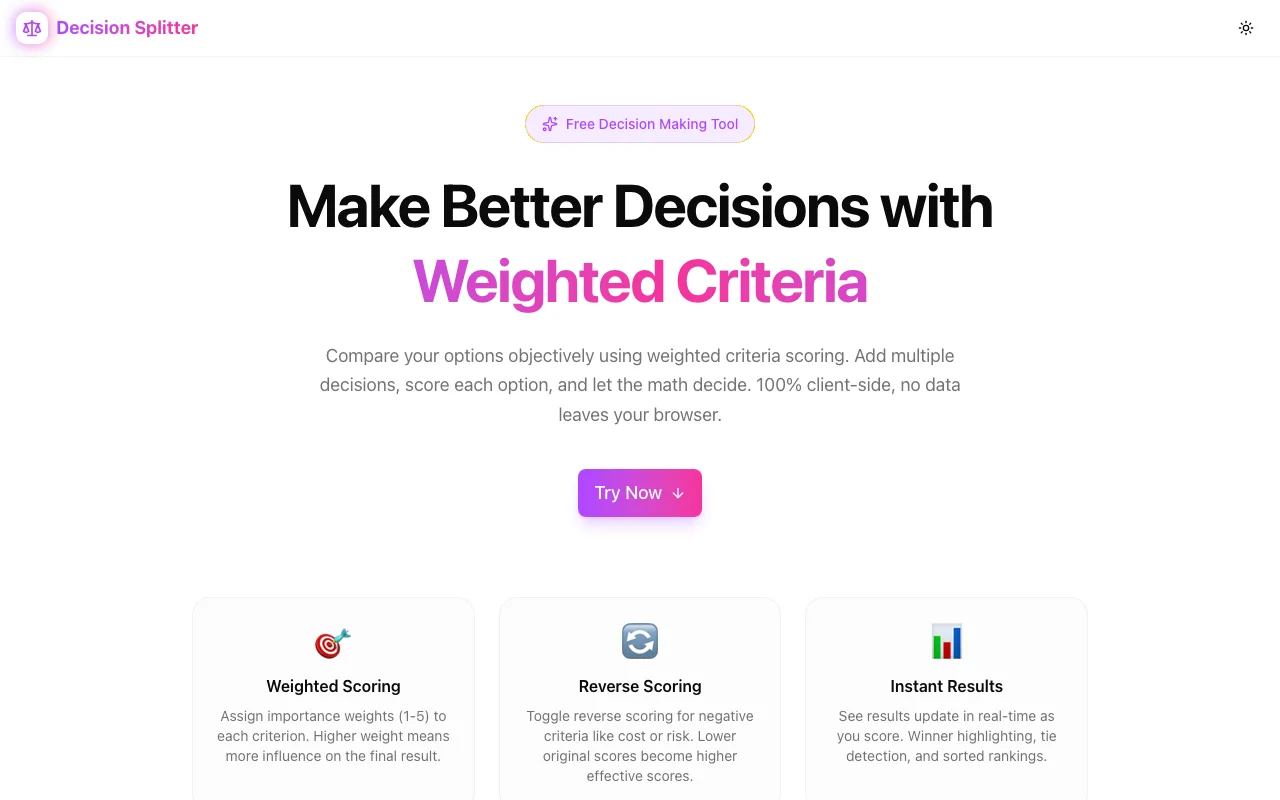
Productivity Tools
Decision Splitter
A multi-criteria decision analysis tool that helps you make better choices. Define criteria with custom weights, score options on a 1–10 scale, and see ranked results instantly—100% client-side, no sign-up required.
Decision MakingMulti-Criteria AnalysisProductivityPrivacyNext.jsTypeScript
Start Similar ProjectAbout the Project
Decision Splitter — Make Better Decisions
Decision Splitter is a weighted multi-criteria decision analysis tool that turns difficult choices into structured, data-driven outcomes. Define what matters, score your options, and let the math surface the best choice—all without leaving your browser.
The Problem with Big Decisions
When choosing between jobs, apartments, tools, or strategies, we tend to:
- Overthink some factors while ignoring others
- Let emotions override logic
- Forget criteria mid-comparison
- Struggle to compare more than two options at once
Decision Splitter replaces gut feelings with a repeatable, transparent process.
How It Works
1. Define Criteria
List the factors that matter to your decision:
- Cost — How affordable is each option?
- Quality — How well-built or reliable is it?
- Location — How convenient is the commute?
- Growth Potential — What's the upside over time?
Each criterion gets a weight from 1–5, letting you prioritize what matters most.
2. Add Options
Enter the choices you're comparing. There's no limit—compare two options or twenty.
3. Score Each Option
Rate every option against every criterion on a 1–10 scale. The score matrix makes this fast and visual.
Some criteria benefit from reverse scoring—for example, lower cost is better. Toggle reverse mode and the algorithm flips the math automatically (11 - score).
4. See Ranked Results
Decision Splitter calculates weighted scores and ranks your options from best to worst. The winner is highlighted, and ties are detected and flagged.
Multi-Decision Workspace
Manage multiple decisions in a single workspace:
- Sidebar navigation — Switch between decisions instantly
- Independent state — Each decision has its own criteria, options, and scores
- Create and delete — Spin up new decisions or remove old ones
- Rename inline — Click the title to rename any decision
Compare job offers in one tab while evaluating apartments in another—all in the same session.
Privacy-First Architecture
Your decision data stays on your device:
- No accounts — Start using immediately
- No servers — All processing is client-side
- No tracking — Zero analytics on your personal data
- localStorage persistence — Decisions survive page refreshes and browser restarts
The Scoring Algorithm
Decision Splitter uses a straightforward weighted scoring model:
- Normalize weights — Each criterion's weight (1–5) is divided by the total weight sum
- Apply scores — Each option's score (1–10) is multiplied by the normalized weight
- Reverse scoring — If a criterion is marked as "lower is better," the score becomes
11 - original - Sum and rank — Total weighted scores determine the ranking
This approach is transparent—you can trace exactly why one option ranked higher than another.
The User Experience
Dashboard Layout
A wide workspace with clear sections:
- Left sidebar — Decision list with create/delete/switch
- Main area — Tabbed interface for criteria, options, scores, and results
- Responsive design — Works on desktop and tablet
Score Matrix
A grid where rows are options and columns are criteria. Click any cell to update a score. Color coding helps you spot patterns at a glance.
Results Panel
Sorted cards showing each option's total score, percentage, and rank. The winner gets a highlighted treatment. When two options score identically, a tie indicator appears.
Technical Implementation
Core Technologies
- Next.js 16 with App Router
- TypeScript in strict mode
- TailwindCSS v4 with OKLCH color tokens
- shadcn/ui for accessible components
- Framer Motion for smooth animations
State Management
- All state lives in a single
DecisionWorkspacecomponent - Immutable update patterns using spread operators
useMemofor derived calculations (results, rankings)useCallbackfor stable handler references
Data Persistence
- localStorage with hydration flag to prevent SSR/CSR mismatch
- Automatic save on every state change
- Graceful fallback if localStorage is unavailable
Performance
- Score recalculation is O(options × criteria)—instant for typical use
- No external API calls—zero network latency
- Lightweight bundle with code splitting
Use Cases
Career Decisions
Compare job offers across salary, benefits, growth, location, culture, and work-life balance. Weight what matters most to you.
Product Comparisons
Evaluating SaaS tools, laptops, or phones? List your requirements as criteria, score each product, and let the numbers decide.
Team Decisions
Share your screen in a meeting. Add criteria collaboratively, score together, and reach consensus with transparent math.
Life Choices
Choosing a city to move to, a school for your kids, or a car to buy—Decision Splitter handles any multi-factor comparison.
Strategic Planning
Prioritize features, evaluate vendors, or rank investment opportunities using consistent, repeatable criteria.
Why Decision Splitter?
vs. Spreadsheets
- Purpose-built UI — No formulas to write or maintain
- Automatic ranking — Results update as you score
- Reverse scoring — Built-in, no formula gymnastics
- Multi-decision — Manage several analyses in one place
vs. Pros/Cons Lists
- Weighted factors — Not all criteria are equal
- Quantified scores — Numbers beat vague feelings
- Ranked output — Clear winner, not ambiguous lists
- Tie detection — Know when options are truly equal
vs. Decision Matrix Apps
- No sign-up — Start immediately
- No cost — Free forever
- No data collection — Complete privacy
- Fast — No server round-trips
Results
Decision Splitter delivers clarity:
- Structured process — Never forget a criterion or skip a comparison
- Transparent ranking — Trace exactly why one option won
- Repeatable — Use the same framework for every big decision
- Private — Your career, financial, and life decisions stay yours
Try it now: decision-splitter.jagodana.com
The Challenge
The client needed a robust productivity tools solution that could scale with their growing user base while maintaining a seamless user experience across all devices.
The Solution
We built a modern application using Decision Making and Multi-Criteria Analysis, focusing on performance, accessibility, and a delightful user experience.
Project Details
Category
Productivity Tools
Technologies
Decision Making,Multi-Criteria Analysis,Productivity,Privacy,Next.js,TypeScript
Date
February 2026
Related Projects
More work in Productivity Tools