Back to Projects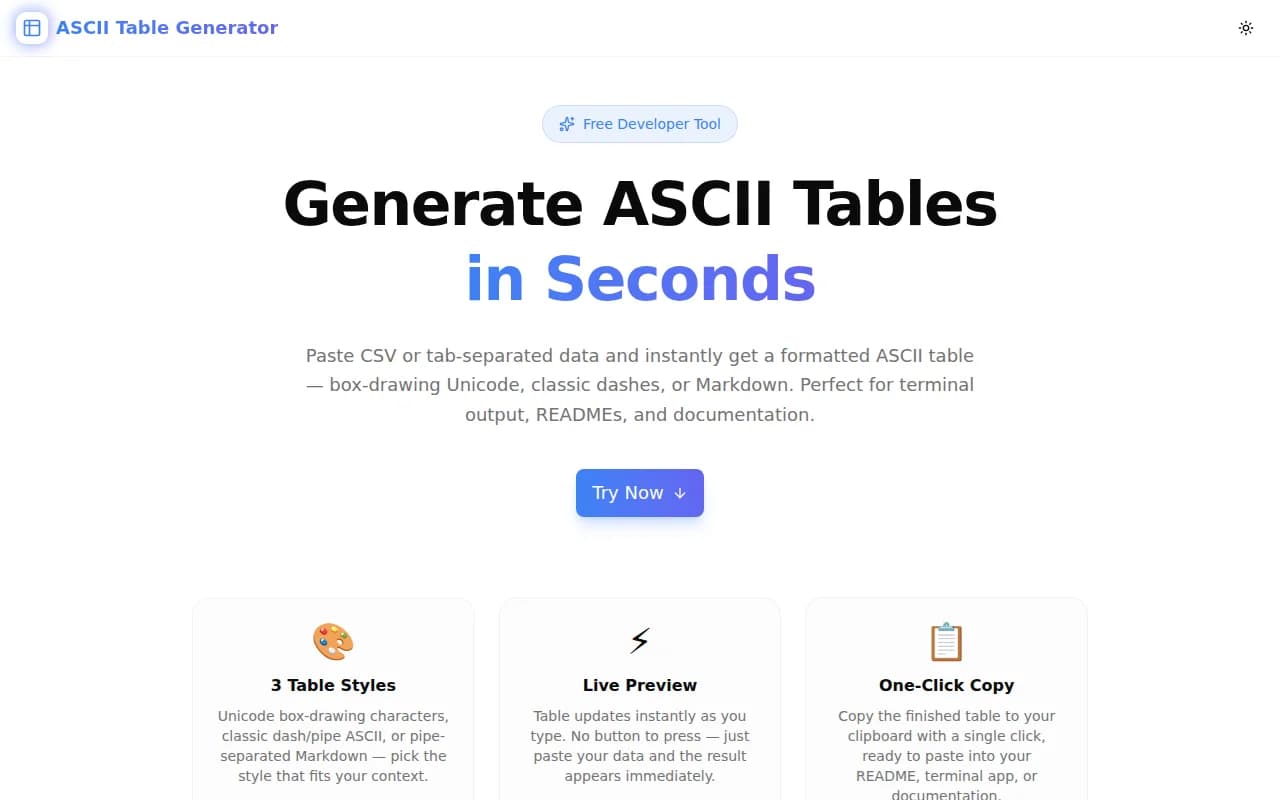
Developer ToolsFeatured
ASCII Table Generator
A free browser-based tool that converts CSV or tab-separated data into formatted ASCII tables — Unicode box-drawing, classic dash-pipe, or Markdown — with per-column alignment and one-click copy.
ASCIITablesDeveloper ToolsTerminalCLIREADMENext.jsTypeScript
Start Similar ProjectAbout the Project
ASCII Table Generator — Format Tables for Terminals, READMEs & Docs
ASCII Table Generator is a free, browser-based tool that turns raw CSV or tab-separated data into beautifully formatted tables. Pick Unicode box-drawing characters, classic dash-pipe ASCII, or pipe-separated Markdown. Control per-column alignment. Copy with one click. No signup, no server, everything runs in your browser.
The Problem
Displaying tabular data in terminal output, CLI help text, README files, and code comments is common work. The options are frustrating:
- Manual formatting — counting spaces, aligning pipes by hand, breaking whenever data changes
- Library dependencies — installing
cli-table3,tabulate, orrichjust to format a small output - Markdown-only tools — online table generators produce only
|---|syntax, which renders beautifully in GitHub but looks like noise in a terminal
There's no fast, no-install, zero-friction tool that handles all three formats at once.
How It Works
1. Paste Your Data
Type or paste CSV (comma-separated) or TSV (tab-separated) data into the input field. The first row becomes the header row. Data updates the preview instantly — no button press needed.
2. Choose a Table Style
Three styles are available:
Unicode Box — uses box-drawing characters for polished terminal output:
┌──────────────┬──────────────────────┬────────────┬────────────┐
│ Name         │ Role                 │ Language   │ Experience │
├──────────────┼──────────────────────┼────────────┼────────────┤
│ Alice Chen   │ Backend Engineer     │ Go         │ 8 years    │
│ Bob Martinez │ Frontend Dev         │ TypeScript │ 5 years    │
└──────────────┴──────────────────────┴────────────┴────────────┘
Classic ASCII — uses +, -, and | for maximum compatibility with any font or terminal:
+--------------+----------------------+------------+------------+
| Name         | Role                 | Language   | Experience |
+--------------+----------------------+------------+------------+
| Alice Chen   | Backend Engineer     | Go         | 8 years    |
+--------------+----------------------+------------+------------+
Markdown — pipe-table syntax compatible with GitHub Flavored Markdown, Notion, and most documentation platforms:
| Name         | Role                 | Language   | Experience |
|--------------|----------------------|------------|------------|
| Alice Chen   | Backend Engineer     | Go         | 8 years    |
| Bob Martinez | Frontend Dev         | TypeScript | 5 years    |
3. Set Column Alignment
Each column has its own alignment toggle: Left, Center, or Right. Alignment is reflected in the rendered table and in the Markdown column dividers (:---, :---:, ---:).
4. Copy the Result
Click the Copy button to send the finished table to your clipboard, ready to paste anywhere.
Key Features
- 3 table styles — Unicode box-drawing, classic ASCII, Markdown
- Per-column alignment — Left, Center, or Right per column
- CSV and TSV input — auto-detects the separator
- Live preview — updates on every keystroke
- One-click copy — clipboard API, no fuss
- Character count and line count — see what you're getting before you copy
- Fully client-side — no server, no uploads, no data retention
- No signup required — open the URL and start
Technical Implementation
Core Technologies
- Next.js 16 with App Router
- TypeScript in strict mode
- Tailwind CSS v4 with OKLCH color tokens
- shadcn/ui components (new-york style)
- framer-motion for animations
Architecture
The table generation logic is pure TypeScript with zero external dependencies:
parseCSV()— splits input by line, auto-detects comma vs. tab separator, trims whitespacepadCell()— pads a string to a target width with left/center/right alignmentbuildUnicode()— generates top, mid, and bot border rows using box-drawing charactersbuildClassic()— generates divider and data rows using+,-,|buildMarkdown()— generates header row, separator row (with alignment markers), and data rows
Column widths are computed from the maximum content length across all rows, ensuring aligned output regardless of data variability.
Use Cases
Terminal Output for CLI Tools
When building CLI tools, help text and data outputs often need tabular formatting. The Unicode style produces polished output that looks native to modern terminal emulators. The Classic ASCII style ensures compatibility with older terminals and SSH sessions where box-drawing fonts may not render correctly.
README Tables
GitHub README files support Markdown tables, but writing them by hand is tedious: every pipe needs a space, divider rows need to match column widths, and realignment after adding a row means redoing everything. Paste your data here, switch to Markdown style, copy, done.
Code Documentation
Inline documentation in code often needs to show data mappings, configuration options, or API response shapes in table form. ASCII tables in comments and docstrings keep the formatting legible in plain-text editors and code review diffs.
Database Query Results
When sharing a quick SQL query result in a Slack message, GitHub issue, or team wiki, copying the raw output from psql or mysql CLI gives you something hard to read. Paste it here, get a properly formatted table, paste it where it needs to go.
Comparison Tables in Docs
Technical documentation frequently needs comparison tables: feature matrices, option comparisons, performance benchmarks. The tool handles any structured data quickly, leaving you to focus on content rather than formatting.
Why ASCII Table Generator?
vs. Manual Formatting
Manual ASCII table formatting breaks the moment any data changes. Column widths need recalculating, every row needs re-padding, every border needs rebuilding. The tool automates all of this from the data.
vs. cli-table3 / tabulate / rich
Those are excellent libraries for programmatic use, but they require a language runtime, a package install, and code to run them. When you just need to format some data right now, a browser tool is faster.
vs. Markdown-Only Generators
Markdown tables render well on platforms that support them, but look like |---| noise in terminals and plain-text editors. The ASCII Table Generator provides the right output format for each context.
Try it now: ascii-table-generator.tools.jagodana.com
The Challenge
The client needed a robust developer tools solution that could scale with their growing user base while maintaining a seamless user experience across all devices.
The Solution
We built a modern application using ASCII and Tables, focusing on performance, accessibility, and a delightful user experience.
Project Details
Category
Developer Tools
Technologies
ASCII,Tables,Developer Tools,Terminal,CLI,README,Next.js,TypeScript
Date
May 2026
Related Projects
More work in Developer Tools

