Back to Projects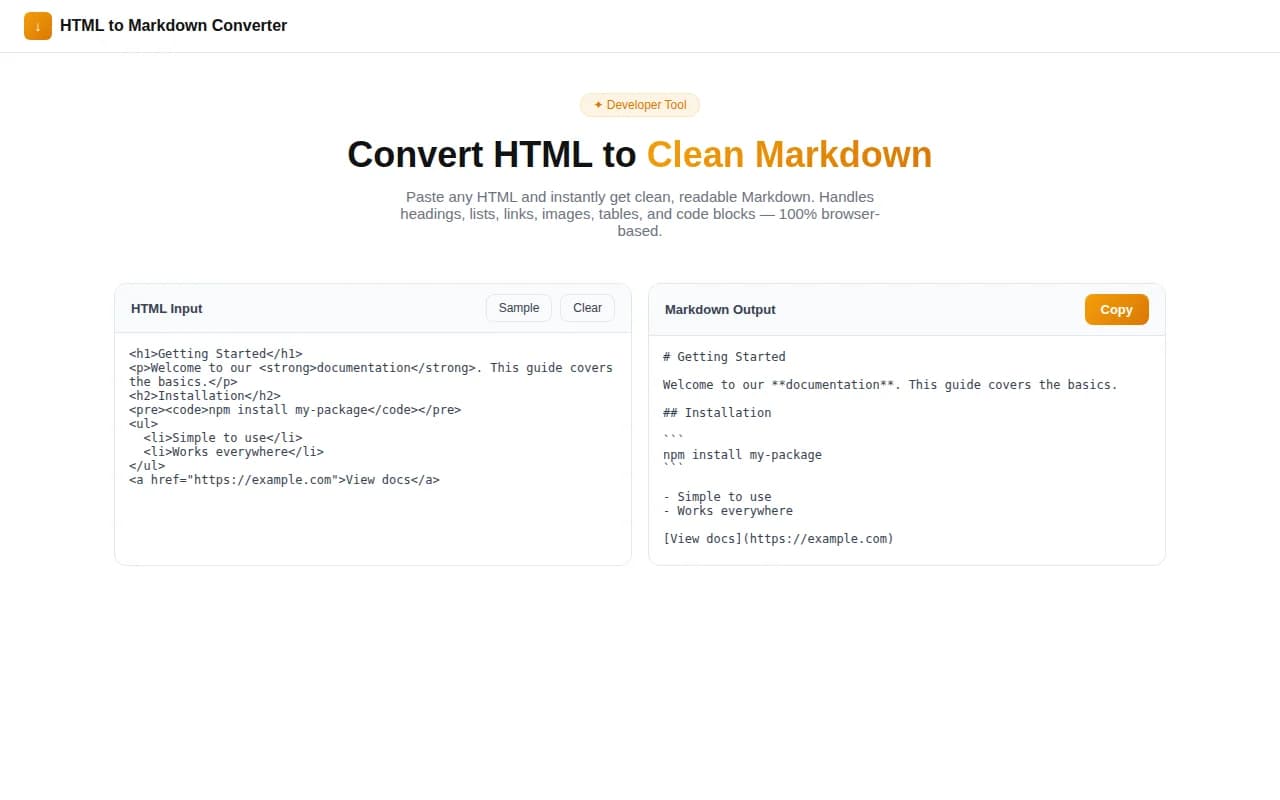
Developer ToolsFeatured
HTML to Markdown Converter
A free, instant, browser-based tool that converts any HTML into clean, readable Markdown. Handles headings, lists, links, images, code blocks, tables, and blockquotes — no login, no server, 100% client-side.
HTMLMarkdownDeveloper ToolsFrontendNext.jsTypeScript
Start Similar ProjectAbout the Project
HTML to Markdown Converter — Instant Browser-Based Conversion
HTML to Markdown Converter is a free, browser-based tool that turns any HTML into clean, readable Markdown instantly. Paste a snippet, a full page source, or a blog post — you get properly formatted Markdown with headings, lists, links, images, code blocks, tables, and blockquotes, all handled correctly. No login, no file upload, no server involved.
The Problem
HTML and Markdown serve different purposes, but content constantly moves between them. A blog post lives in a CMS that outputs HTML. A documentation site requires Markdown. A developer copies content from a web page and needs it in a .md file. A writer exports from a WYSIWYG editor and ends up with a wall of <p> and <span> tags.
Hand-converting HTML to Markdown is tedious. You strip tags, replace <strong> with **, reformat ordered lists, convert <a href=""> into [text](url), and manually rebuild tables. One page can take ten minutes. One nested HTML structure can introduce subtle bugs.
Most conversion libraries require Node.js, a Python environment, or an API call. None of those options belong in a quick content workflow.
How It Works
Instant Live Conversion
Paste HTML into the left panel. Markdown appears in the right panel immediately — no button click, no debounce delay. The converter runs entirely in the browser using the native DOM parser, so every change you make to the input produces output in milliseconds.
Comprehensive Tag Support
The converter handles all common HTML elements:
- Headings —
<h1>through<h6>become#through###### - Inline formatting —
<strong>/<b>→**bold**,<em>/<i>→*italic*,<del>/<s>→~~strikethrough~~ - Links —
<a href="..." title="...">→[text](url "title") - Images —
<img src="..." alt="..." title="...">→ - Lists —
<ul>,<ol>, nested<li>with correct indentation - Blockquotes —
<blockquote>with proper>prefix on every line - Code — inline
<code>→ backtick,<pre><code class="language-js">→ fenced code block with language hint - Tables —
<table>,<thead>,<tbody>,<tr>,<th>,<td>→ GitHub Flavored Markdown table - Horizontal rule —
<hr>→--- - Line breaks —
<br>→ trailing two-space line break
Full-Page HTML Handling
Paste the complete HTML source of a webpage and the converter automatically strips <script>, <style>, <head>, and <noscript> tags, extracting only the visible content. The result is a clean Markdown representation of what the page shows to readers — not the full DOM boilerplate.
Copy and Download
Two export options: copy the Markdown to the clipboard with a single click, or download it as converted.md. The character count and line count update live so you can see the output size before exporting.
Key Features
- Live conversion — Markdown updates as you type or paste, no delay
- DOM-based parsing — uses the browser's built-in HTML parser for correctness
- GFM table support — produces GitHub Flavored Markdown tables from any
<table>element - Code block language detection — reads the
language-*class from<code>elements - Nested list support — multi-level ordered and unordered lists with correct indentation
- Copy + download — one-click clipboard copy or
.mdfile download - 100% client-side — no server, no uploads, no tracking of input
- Sample HTML included — load a sample to explore the output immediately
Technical Implementation
Core Technologies
- Next.js with App Router
- TypeScript in strict mode
- TailwindCSS v4 for styling
- Framer Motion for panel animations
- Browser DOMParser — zero conversion library dependencies
Architecture
The converter is implemented as a recursive DOM walker. When HTML is pasted:
DOMParser.parseFromString(html, "text/html")parses the string into a real DOM<script>,<style>,<head>, and<noscript>nodes are removed- A recursive
convertNode()function walks every node, switching on the element'stagName - Leaf text nodes are returned as-is with whitespace collapsed
- Block elements add surrounding
\n\nnewlines; inline elements wrap content with their Markdown syntax - Tables get a dedicated
convertTable()function that reads row/cell structure and produces| cell | cell |rows with a separator row after the header - Lists use a
convertList()function that tracks ordered/unordered context and handles nesting with two-space indentation - A final cleanup pass collapses three or more consecutive newlines to two
All of this runs synchronously in a React useEffect that fires on every input change.
Client-Side Only
No API routes, no environment variables at runtime, no network calls from the tool itself. The Next.js app is statically exportable. The conversion function has no side effects and operates entirely on browser DOM APIs.
Use Cases
Converting CMS or Blog Content
Most CMS platforms (WordPress, Webflow, HubSpot) store content as HTML. When migrating to a static site generator, documentation platform, or Markdown-based CMS like Contentful or Sanity, convert existing posts by pasting their HTML source and downloading the .md output.
Cleaning Up WYSIWYG Editor Output
Rich text editors generate messy HTML — nested spans, inline styles, non-semantic markup. The converter strips the noise and returns clean, semantic Markdown that you can commit to a repository or paste into a documentation system.
Scraping and Archiving Web Content
Copy a web page's source, paste it into the converter, and get a structured Markdown archive. Useful for offline reading, knowledge bases, or documentation references.
Preparing Content for GitHub or GitLab
GitHub and GitLab render Markdown in issues, PRs, wikis, and READMEs. When you have content in HTML format — from a design spec, a brief, or a stakeholder document — converting it to Markdown makes it ready to commit without any manual reformatting.
API Documentation Migration
OpenAPI HTML output, Swagger UI pages, and Postman documentation exports are all HTML. Converting them to Markdown makes them portable, version-controllable, and compatible with any Markdown-based documentation tool.
Why HTML to Markdown Converter?
vs. Online Paste Tools
Most paste-to-convert tools are ad-heavy, require login, or send your content to a server. This converter runs entirely in the browser — no data leaves your machine, and there are no accounts.
vs. CLI Tools (Pandoc, html2text)
Pandoc is powerful but requires installation, familiarity with command-line flags, and a separate step for every conversion. This tool is always open in a browser tab, zero install, ready in seconds.
vs. Browser Extensions
Extensions have access to your entire browsing session and all tabs. A browser-based tool that runs only when you open it is a smaller attack surface for content you wouldn't want a third party to see.
Results
HTML to Markdown Converter reduces HTML-to-Markdown conversion from a multi-step process (install a library, write a script, run it, inspect the output) to a paste-and-copy workflow that takes under 30 seconds.
Try it now: html-to-markdown-converter.tools.jagodana.com
The Challenge
The client needed a robust developer tools solution that could scale with their growing user base while maintaining a seamless user experience across all devices.
The Solution
We built a modern application using HTML and Markdown, focusing on performance, accessibility, and a delightful user experience.
Project Details
Category
Developer Tools
Technologies
HTML,Markdown,Developer Tools,Frontend,Next.js,TypeScript
Date
July 2026
Related Projects
More work in Developer Tools

