Back to Projects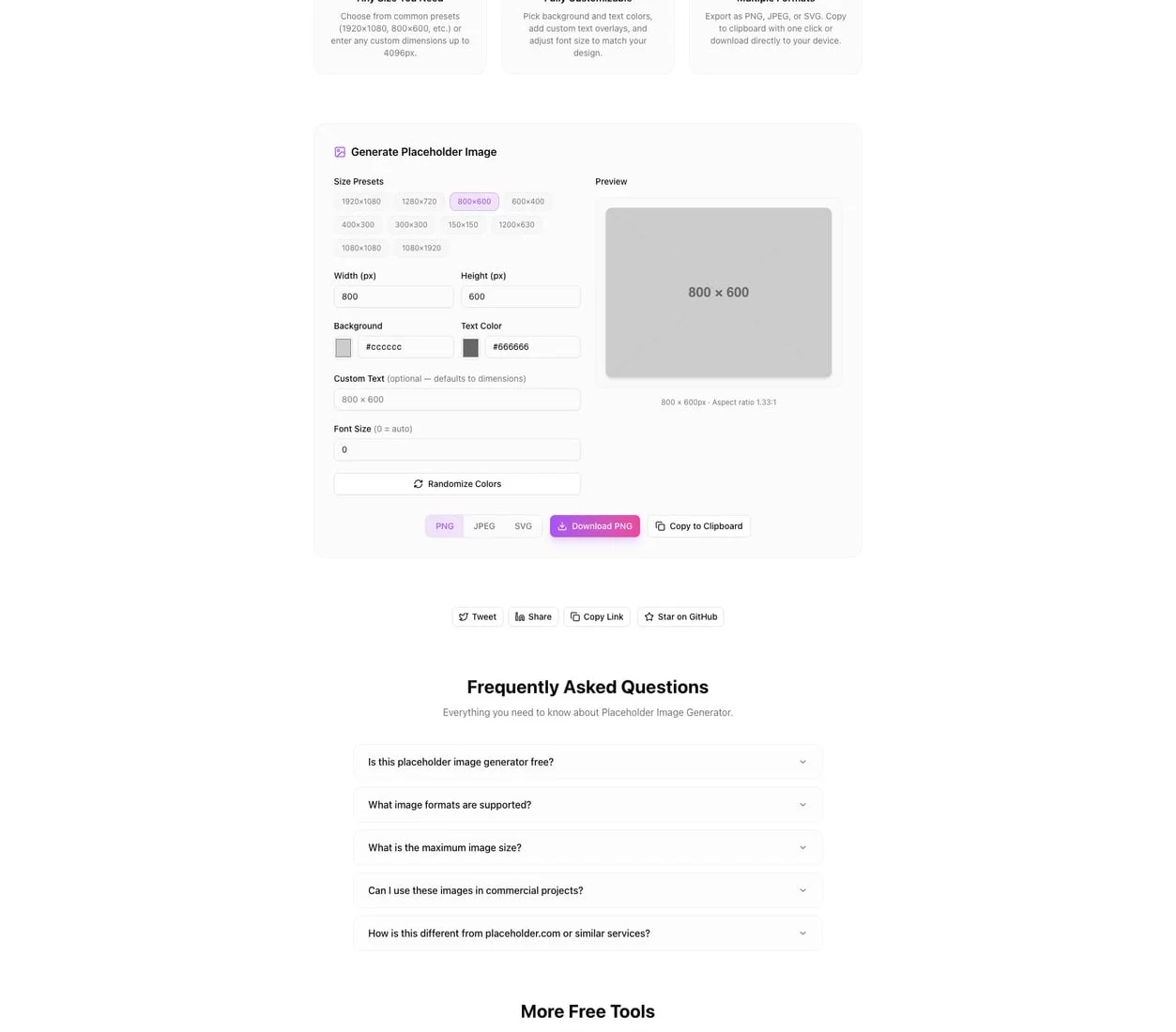
Developer ToolsFeatured
Placeholder Image Generator
A browser-based tool for creating custom placeholder images with precise dimensions, colors, text overlays, and multi-format export. Perfect for mockups, wireframes, and rapid prototyping.
ImagesDesignDeveloper ToolsPrototypingNext.jsTypeScript
Start Similar ProjectAbout the Project
Placeholder Image Generator — Create Custom Placeholder Images Instantly
Placeholder Image Generator is a free, browser-based tool for creating custom placeholder images with exact dimensions, colors, text overlays, and multi-format export. Set your width and height, pick background and text colors, add custom label text, and download in PNG, JPEG, SVG, or WebP—all without leaving the browser.
The Problem
Every design and development workflow needs placeholder images. Wireframes need them to represent future content. Mockups need them to show layout without waiting for final photography. Frontend developers need them to build responsive layouts before real assets arrive.
The usual approach: use a third-party placeholder service URL (like via.placeholder.com/600x400) embedded directly in your HTML. This works until you need something specific—a particular color scheme to match your design system, custom text to indicate what the image represents, or an image that works offline without depending on an external service.
Other developers reach for design tools. Open Figma, create a rectangle, set the size, add text, export. It works, but it's slow for something this simple—especially when you need a dozen different sizes for responsive breakpoints.
How It Works
1. Set Dimensions
Enter the exact width and height in pixels. Common aspect ratios and standard sizes are available as presets—social media covers, hero banners, thumbnails, app icons—but you can type any dimension. Need a 1347×892 image? Just type it.
2. Choose Colors
Pick a background color and a text color. Use the color picker, enter a hex code, or choose from presets that cover common UI patterns. The interface shows a live preview so you can see how the colors look together before downloading.
3. Add Custom Text
By default, the image displays its dimensions (e.g., "600 × 400"). Override this with any custom text—"Hero Banner," "Product Photo," "User Avatar"—whatever describes the placeholder's intended content. The text auto-sizes to fit the image dimensions.
4. Export in Multiple Formats
Download in the format that fits your workflow:
- PNG — lossless, best for mockups and presentations
- JPEG — smaller file size, good for quick layout testing
- SVG — scalable vector, perfect for responsive design and design systems
- WebP — modern format with excellent compression for web use
Key Features
- Precise dimensions — any width and height, no restrictions
- Custom colors — full hex color support for background and text
- Custom text overlays — label your placeholders with meaningful descriptions
- Multi-format export — PNG, JPEG, SVG, and WebP
- Dimension presets — quick access to standard sizes (social media, banners, icons)
- Live preview — see your placeholder before downloading
- Client-side rendering — images are generated in the browser, nothing uploaded to a server
- No signup required — start creating immediately
Use Cases
Wireframing
When building wireframes, placeholder images communicate layout structure without distracting with real content. Custom text like "Product Image" or "Team Photo" makes wireframes self-documenting—stakeholders understand what goes where without a separate legend.
UI Prototyping
Frontend developers building component libraries need placeholder images at specific dimensions to test responsive behavior. Generate a set of images at your breakpoints—mobile, tablet, desktop—and test how your layout adapts. No external service dependency means your dev environment works offline.
Design Mockups
Designers presenting mockups to clients need placeholders that match the brand's color palette. A grey rectangle with "600 × 400" in white text doesn't communicate quality. A placeholder in the brand's primary color with descriptive text shows intentionality.
Content Management Systems
Building CMS templates where content editors will eventually upload real images? Placeholder images with descriptive labels ("Featured Image — 1200×630") guide editors on the expected dimensions and help QA teams verify that layouts handle images correctly.
Rapid API Prototyping
When building frontend prototypes against mock APIs, you need image URLs that actually render. Generate your placeholders locally, serve them from your dev server, and your prototype looks complete—no dependency on placeholder.com being up or supporting your exact requirements.
Technical Implementation
Core Technologies
- Next.js with App Router
- TypeScript in strict mode
- TailwindCSS for styling
- Canvas API for client-side image generation
- shadcn/ui for accessible components
Architecture
- Client-side Canvas rendering for instant image generation
- Multi-format export pipeline (PNG, JPEG via Canvas, SVG via markup generation, WebP via Canvas encoding)
- Responsive layout that works across screen sizes
- Zero server dependencies—all processing happens in the browser
Why Placeholder Image Generator?
vs. External Placeholder Services (placeholder.com, placehold.co)
- Works offline — no dependency on a third-party server
- Full customization — colors, text, and format options beyond URL parameters
- Privacy — nothing is sent to an external service
- Downloadable files — save actual image files for presentations, docs, and prototypes
vs. Design Tools (Figma, Sketch)
- Faster — no app switching, no creating shapes and exporting
- Purpose-built — designed specifically for placeholder generation
- Accessible — runs in any browser, no paid subscription needed
- Batch-friendly — change dimensions and download a new image in seconds
vs. Lorem Picsum / Unsplash Placeholders
- Predictable — solid colors and text instead of random photos
- Consistent — every placeholder looks intentional and uniform
- Customizable — match your design system's color palette
- Descriptive — custom text labels explain what each placeholder represents
Results
Placeholder Image Generator streamlines the placeholder workflow for developers and designers:
- Eliminates external dependencies — no reliance on third-party placeholder services
- Speeds up prototyping — generate any size image in seconds
- Improves communication — labeled placeholders make wireframes self-documenting
- Supports modern formats — export in WebP and SVG alongside PNG and JPEG
Try it now: placeholder-image-generator.tools.jagodana.com
The Challenge
The client needed a robust developer tools solution that could scale with their growing user base while maintaining a seamless user experience across all devices.
The Solution
We built a modern application using Images and Design, focusing on performance, accessibility, and a delightful user experience.
Project Details
Category
Developer Tools
Technologies
Images,Design,Developer Tools,Prototyping,Next.js,TypeScript
Date
March 2026
Related Projects
More work in Developer Tools

