Back to Projects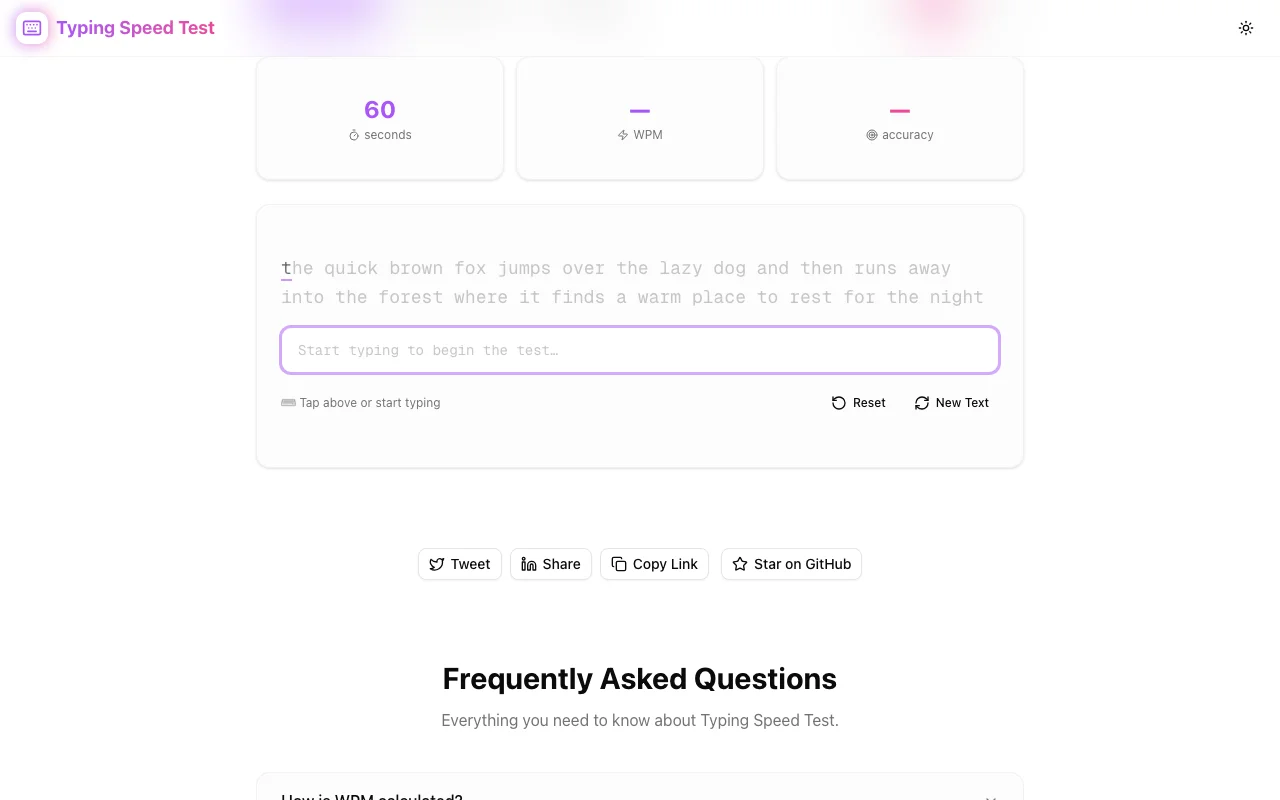
Developer ToolsFeatured
Typing Speed Test
A free, instant typing speed test that measures your WPM and accuracy across code snippets, famous quotes, and common words — no signup, all in your browser.
TypingWPMProductivityDeveloper ToolsNext.jsTypeScript
Start Similar ProjectAbout the Project
Typing Speed Test — Measure Your WPM & Accuracy
Typing Speed Test is a free, browser-based tool that measures your words per minute and accuracy in real time. Choose from code snippets, famous quotes, or common words, type through the passage, and get instant feedback on your speed and precision — no account required.
The Problem
Typing speed matters more than most developers admit. Faster typing means less friction between thinking and executing — whether you're writing code, responding to pull request comments, or drafting documentation. But measuring it is surprisingly annoying:
- Most typing tests feel like toys. Giant monkey GIFs, gamification layers, leaderboards nobody asked for. You just want to know your WPM.
- No code mode. Standard typing tests use prose. Developers type code — with brackets, semicolons, camelCase, and indentation. Prose WPM doesn't reflect real-world coding speed.
- Signup walls. Many tests require an account to save results or even take the test. You don't need an account to type.
- Inaccurate measurement. Some tools count raw speed without properly accounting for errors, giving inflated numbers that don't reflect actual productive typing.
How It Works
1. Pick Your Mode
Choose what kind of text you want to type:
- Code — real code snippets with syntax you'd encounter daily: functions, conditionals, loops, variable declarations. Tests your ability to type special characters (
{},=>,===,()) at speed. - Quotes — famous quotes and literary passages. Good for measuring natural prose typing speed.
- Words — common English words in random order. The classic typing test format — pure speed measurement without context.
Each mode tests a different aspect of your typing. Code mode is the most practical for developers; quotes and words give a general baseline.
2. Start Typing
The passage appears on screen. Start typing and the timer begins automatically — no countdown, no "ready set go". Just type.
As you type, each character is highlighted in real time:
- Correct characters light up green — you're on track.
- Errors are highlighted red — you can see exactly where you mistyped.
- Current position is clearly marked so you always know where you are in the passage.
The visual feedback is immediate. You don't have to finish the test to know how you're doing.
3. Get Your Results
When you finish the passage, you get your results instantly:
- WPM (Words Per Minute) — your typing speed, calculated as characters typed divided by five (the standard word-length convention), divided by elapsed time in minutes.
- Accuracy — the percentage of characters you typed correctly on the first attempt.
- Time elapsed — how long the passage took you.
No results page to navigate to, no email to confirm. The numbers appear as soon as you type the last character.
4. Try Again
Reset and go again. Different passages each time so you're not memorising the text. Track your improvement across sessions by noting your scores — or just use it as a quick warm-up before a coding session.
Key Features
- Three text modes — code snippets, famous quotes, and common words
- Real-time WPM tracking — speed updates as you type, not just at the end
- Character-level accuracy — see exactly which characters you got right and wrong
- Visual feedback — green for correct, red for errors, clear current position
- Code-specific content — actual code with brackets, operators, and syntax
- Instant results — WPM, accuracy, and time the moment you finish
- No timer pressure — the clock starts when you start typing, not before
- Client-side only — no server, no data collection, your typing stays in your browser
- No signup — open the URL and type
Technical Implementation
Core Technologies
- Next.js with App Router
- TypeScript in strict mode
- TailwindCSS for styling
- shadcn/ui for accessible components
- Framer Motion for animations
Architecture
- Pure client-side typing engine — all measurement happens in the browser
- Character-by-character comparison against the source text
- Real-time WPM calculation using standard 5-character word convention
- Text content curated per mode — code snippets are real, readable code
- Full SEO setup with JSON-LD structured data
Use Cases
Developer Warm-Up
Start your coding day with a 60-second typing test in code mode. It's like stretching before a run — gets your fingers moving and your brain in typing mode before you touch production code.
Measuring Real Coding Speed
Your prose WPM doesn't tell the whole story. Code mode includes the special characters that slow most people down: curly braces, angle brackets, arrow functions, triple equals. Your code WPM is the number that actually matters for development productivity.
Identifying Weak Spots
The character-level accuracy highlighting shows you exactly where you struggle. Maybe you consistently miss the { key, or you fumble === every time. Knowing your weak spots is the first step to fixing them.
Onboarding Benchmark
Teams that care about developer productivity can use the tool as a low-pressure baseline measurement. Not a gate — just data. A developer who types 30 WPM in code mode might benefit from a typing practice routine; one who types 80 WPM probably doesn't.
Interview Preparation
Technical interviews increasingly involve live coding. Being a fast, accurate typist means more time thinking about the problem and less time fighting the keyboard. A few days of practice before an interview can make a noticeable difference.
Writers and Content Creators
Not just for developers. Anyone who writes for a living — copywriters, journalists, documentation authors — can use quotes or words mode to benchmark and improve their typing speed.
Why Typing Speed Test?
vs. Monkeytype
Monkeytype is excellent but complex — themes, configurations, competitive leaderboards, accounts. Typing Speed Test is deliberately simpler: pick a mode, type, get your score. No configuration needed.
vs. TypeRacer
TypeRacer is a game. You race other people. That's fun, but it's not what you need when you want a quick, private measurement of your typing speed at 10 AM on a Tuesday.
vs. keybr.com
keybr focuses on teaching you to type better through algorithmic exercises. Typing Speed Test focuses on measurement — how fast are you right now, with your current skill? Different goals.
vs. typing.com
typing.com is a full course with lessons, certificates, and classroom management. Overkill if you just want to know your WPM.
Results
Typing Speed Test strips away everything that isn't the test:
- Sub-second startup — the test is ready before you are
- Accurate measurement — proper WPM and accuracy calculations
- Real-world relevance — code mode tests what developers actually type
- Zero friction — no account, no setup, no configuration
Try it now: typing-speed-test.tools.jagodana.com
The Challenge
The client needed a robust developer tools solution that could scale with their growing user base while maintaining a seamless user experience across all devices.
The Solution
We built a modern application using Typing and WPM, focusing on performance, accessibility, and a delightful user experience.
Project Details
Category
Developer Tools
Technologies
Typing,WPM,Productivity,Developer Tools,Next.js,TypeScript
Date
March 2026
Related Projects
More work in Developer Tools

