Introducing Decision Splitter: Make Better Decisions with Weighted Criteria
A free, privacy-first multi-criteria decision analysis tool. Define criteria, assign weights, score options, and see ranked results instantly—no sign-up, no servers, 100% client-side.
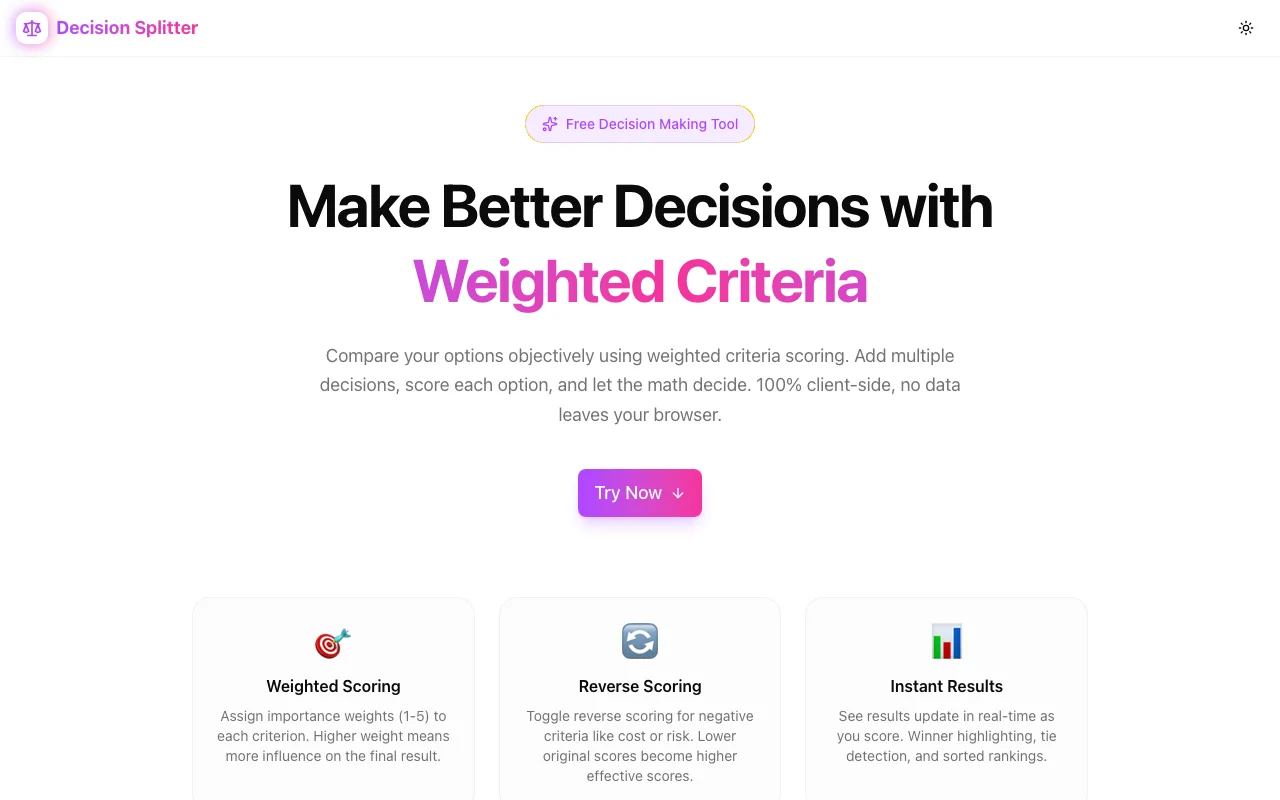
Introducing Decision Splitter: Make Better Decisions with Weighted Criteria
We've all been there. You're choosing between job offers, comparing apartments, evaluating SaaS tools, or deciding where to move—and you're stuck. Pros and cons lists feel incomplete. Spreadsheets get messy. And asking friends just adds more noise.
That's why we built Decision Splitter—a free, privacy-first tool that turns complex decisions into structured, ranked outcomes.
The Decision Problem
Most people make big decisions using one of these approaches:
- Gut feeling — Works sometimes, but biases run deep
- Pros/cons lists — Treats all factors as equal (they're not)
- Spreadsheets — Powerful but tedious to set up and maintain
- Asking around — Adds opinions, not clarity
The real issue? Important decisions have multiple factors with different levels of importance, and our brains aren't great at juggling all of them simultaneously.
A Structured Approach
Decision Splitter uses weighted multi-criteria analysis—a proven decision-making framework used in business, engineering, and research. Here's how it works:
Step 1: Define Your Criteria
List every factor that matters. Choosing a job? Your criteria might be:
- Salary
- Remote work policy
- Growth opportunities
- Team culture
- Commute time
- Tech stack
Step 2: Weight What Matters
Not all criteria are equal. Assign weights from 1 to 5:
- Salary → 5 (critical)
- Remote work → 4 (very important)
- Growth → 4 (very important)
- Culture → 3 (important)
- Commute → 2 (nice to have)
- Tech stack → 3 (important)
Step 3: Score Your Options
Rate each option against each criterion on a 1–10 scale. Some criteria support reverse scoring—like commute time, where lower is better. Toggle it on and the math adjusts automatically.
Step 4: Get Ranked Results
Decision Splitter multiplies each score by its normalized weight, sums them up, and ranks your options. You see exactly which option wins and why.
Multi-Decision Workspace
One of the features we're most excited about: manage multiple decisions in a single workspace.
A sidebar lets you:
- Create new decisions
- Switch between them instantly
- Rename decisions inline
- Delete decisions you no longer need
Evaluating job offers AND apartments at the same time? Each gets its own independent criteria, options, and scores.
Privacy First, Always
Your decisions—career moves, financial choices, life plans—are deeply personal. They shouldn't live on someone else's server.
Decision Splitter processes everything 100% client-side:
- No accounts — No email, no password, no sign-up wall
- No server storage — Data lives in your browser's localStorage
- No tracking — We don't see your criteria, options, or scores
- No subscriptions — Free forever
Your data survives page refreshes and browser restarts, but never leaves your device.
The Math Behind It
The scoring algorithm is deliberately transparent:
- Each criterion has a weight (1–5) and each option has a score (1–10) per criterion
- Weights are normalized:
weight / sum_of_all_weights - For reverse-scored criteria, scores become
11 - original_score - Each option's total = sum of
normalized_weight × scoreacross all criteria - Options are ranked by total score
No black boxes. You can trace exactly why Option A beat Option B.
Real-World Examples
Choosing a New Laptop
Criteria: Price (weight 4, reverse), Performance (5), Battery Life (4), Build Quality (3), Display (3), Portability (3)
Options: MacBook Pro, ThinkPad X1, Dell XPS, Framework 16
Score each laptop against each criterion. Decision Splitter handles the weighted math and shows you which laptop actually fits your priorities best—not just which one has the best specs on paper.
Picking a City to Move To
Criteria: Cost of Living (5, reverse), Job Market (5), Weather (3), Safety (4), Culture (3), Proximity to Family (4)
Options: Austin, Denver, Raleigh, Portland
What seems like an impossible comparison becomes a structured exercise with a clear winner.
Evaluating SaaS Tools for Your Team
Criteria: Price (4, reverse), Feature Completeness (5), Ease of Use (4), Integration Options (3), Support Quality (3), Security (5)
Options: Tool A, Tool B, Tool C
Take the emotion out of vendor selection. Score objectively, weight strategically, and let the data guide the decision.
Built with Modern Tech
Decision Splitter is built on our standard tool template:
- Next.js 16 with App Router for fast, modern React
- TypeScript in strict mode for reliability
- TailwindCSS v4 with custom OKLCH color tokens
- shadcn/ui for accessible, polished components
- Framer Motion for smooth animations
- localStorage for private, persistent data
The entire app loads fast and runs instantly—no spinners, no loading states, no waiting for servers.
Try It Now
Ready to make a better decision?
Free, fast, and completely private. No sign-up required.
Part of Our Free Tools Suite
Decision Splitter joins our growing collection of free, privacy-first tools:
- Favicon Generator — All favicon sizes + manifest in seconds
- OG Preview — See how your links look on social media
- Screenshot Beautifier — Make screenshots presentation-ready
- JSON Formatter — Format, validate, and minify JSON
- SplitWise Lite — Split expenses with friends, no sign-up
- Theme Contrast Checker — Check WCAG color contrast ratios
All built with the same principles: fast, free, and privacy-first.
What's Next?
We're considering several enhancements:
- Export to PDF/CSV — Share your analysis with stakeholders
- Comparison charts — Visual bar/radar charts for option comparison
- Templates — Pre-built criteria sets for common decisions (job offers, apartments, etc.)
- Collaboration mode — Share a decision link for team scoring
Have ideas? We'd love to hear them.
Stop agonizing. Start analyzing. Try Decision Splitter →