Introducing SMTP Test Tool: Test Your Email Credentials Before You Ship
Stop guessing why your emails aren't sending. SMTP Test Tool lets you verify your SMTP server connection, authentication, and delivery with real-time step-by-step diagnostics.
Introducing SMTP Test Tool: Test Your Email Credentials Before You Ship
You've set up your transactional email service, configured the SMTP credentials in your app, deployed to production, and... nothing. No emails. No error messages. Just silence. Sound familiar? That's why we built SMTP Test Tool—a fast, secure way to verify your SMTP credentials actually work before you integrate them into your application.
The Problem with SMTP Debugging
Setting up email sending is one of those tasks that seems simple but hides a surprising number of failure points:
- Wrong port - Is it 465 or 587? TLS or STARTTLS?
- Bad credentials - Did you use an App Password or your regular password?
- Firewall blocks - Is your hosting provider blocking outbound SMTP?
- Provider restrictions - Did you enable "less secure app access" or generate an API key?
- Sender verification - Is your "From" address authorized on the SMTP server?
When something goes wrong, the error messages are often cryptic:
Error: 535 5.7.8 Username and Password not accepted
What does that mean? Is the password wrong? Do you need an App Password? Is 2FA blocking you? Good luck figuring it out from just a number.
Enter SMTP Test Tool
SMTP Test Tool gives you a clear, step-by-step diagnostic of your SMTP configuration. Paste your credentials, click test, and watch the results appear in real time:
- Connection - Can we reach the server? ✅ 243ms
- Authentication - Are the credentials valid? ✅ 0ms
- Delivery - Did the email send successfully? ✅ 892ms
If any step fails, you get a human-friendly error message explaining exactly what went wrong and how to fix it.
Key Features
⚡ Provider Presets
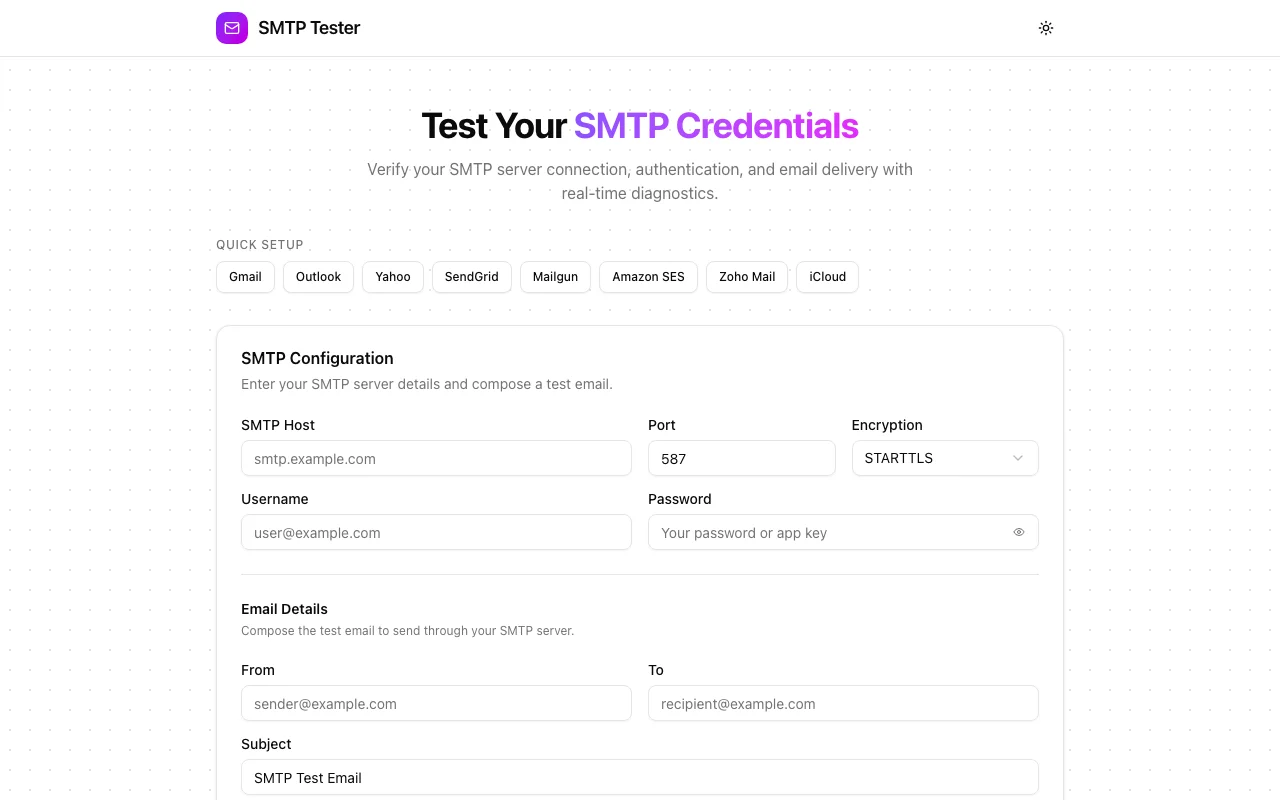
Don't remember your provider's SMTP settings? Neither do we. That's why we included one-click presets for 8 major providers:
- Gmail -
smtp.gmail.com:465(TLS) - Outlook -
smtp.office365.com:587(STARTTLS) - Yahoo -
smtp.mail.yahoo.com:465(TLS) - SendGrid -
smtp.sendgrid.net:587(STARTTLS) - Mailgun -
smtp.mailgun.org:587(STARTTLS) - Amazon SES -
email-smtp.us-east-1.amazonaws.com:465(TLS) - Zoho Mail -
smtp.zoho.com:465(TLS) - iCloud -
smtp.mail.me.com:587(STARTTLS)
Each preset auto-fills the host, port, and encryption settings, plus shows a helpful note about authentication requirements (like "Requires an App Password" for Gmail).
🔍 Two Testing Modes
Not every test needs to send an actual email:
- Send Test Email - Full diagnostic: connect → authenticate → send a real email
- Verify Connection Only - Quick check: connect → authenticate, no email sent
Use "Verify Connection Only" when you just need to confirm credentials work. Use "Send Test Email" when you want to verify end-to-end delivery.
💬 Human-Friendly Errors
We mapped 13 common SMTP error patterns to clear, actionable messages:
| What You'd See | What We Show |
|---|---|
| ECONNREFUSED | "Connection refused. Check the SMTP host and port are correct." |
| 535 Authentication failed | "Authentication failed. Some providers require app-specific passwords." |
| wrong version number | "SSL/TLS version mismatch. Try switching between TLS and STARTTLS." |
| ENOTFOUND | "Host not found. Check for typos in the host address." |
No more Googling error codes.
🔒 Security First
We take credential security seriously:
- Ephemeral - Credentials are used for the single test request and immediately discarded
- Never logged - No server-side logging of usernames or passwords
- Never stored - No database, no cache, no persistence
- Rate limited - 10 requests per minute per IP
- Validated - All input validated with Zod before any SMTP operation
Your credentials are safe. We show a security notice right in the form to give you peace of mind.
📊 Detailed Results
Every test returns:
- Step-by-step status with pass/fail indicators
- Precise timing for each phase (in milliseconds)
- Message ID for successful deliveries
- Total duration
- One-click Copy as JSON for documentation or debugging
How It Works
- Pick a provider (or enter custom SMTP settings)
- Enter credentials (username + password)
- Compose a test email (From, To, Subject, Body)
- Click "Send Test Email" or "Verify Connection Only"
- Watch the results appear step by step
That's it. No signup. No configuration files. No SDK installation.
Real-World Use Cases
Setting Up Transactional Email
Before writing a single line of integration code:
- Open SMTP Test Tool
- Select your provider (e.g., SendGrid)
- Enter your API key
- Send a test email
- Confirm it arrives in your inbox
Now you know the credentials work before you ship.
Debugging Production Issues
"Users aren't receiving emails" — is it your app or the SMTP server?
- Copy the SMTP credentials from your production config
- Test them in SMTP Test Tool
- If the test passes, the issue is in your app code
- If it fails, the error message tells you exactly what's wrong
Client Handoffs
Client gives you SMTP credentials for their email server? Test them immediately instead of discovering they're wrong three sprints later.
Migrating Email Providers
Switching from SendGrid to Mailgun? Test both sets of credentials side by side to verify the new setup before cutting over.
Tech Stack
SMTP Test Tool is built with the modern stack we love:
- Next.js 16 (App Router) for server components
- TypeScript for type safety
- Nodemailer for SMTP operations
- shadcn/ui for beautiful, accessible components
- Framer Motion for smooth animations
- Tailwind CSS for styling
- Zod for input validation
Try It Now
Ready to stop guessing and start testing?
It's free, fast, and your credentials are never stored.
Open Source
SMTP Test Tool is open source! Check out the code, contribute, or fork it:
What's Next?
We're already planning new features:
- DKIM/SPF/DMARC checks - Verify your email authentication records
- TLS certificate inspection - See the server's SSL certificate details
- Connection log - Raw SMTP conversation transcript for advanced debugging
- Bulk credential testing - Test multiple SMTP configs at once
- API access - Integrate SMTP testing into your CI/CD pipeline
Have a feature request? Let us know!
Stop guessing why your emails aren't sending. Try SMTP Test Tool today →