Placeholder Image Generator: Create Custom Placeholder Images for Mockups and Prototypes
Free online placeholder image generator with custom dimensions, colors, text overlays, and PNG/JPEG/SVG/WebP export. No signup, no external dependencies.
Placeholder Image Generator: Create Custom Placeholder Images for Mockups and Prototypes
You're building a landing page. The hero section needs an image. The product grid needs six images. The testimonial cards need avatars. None of the final assets exist yet—the photographer hasn't delivered, the designer is still working on illustrations, the product shots won't be ready until next week.
So you reach for the familiar fix. You drop a via.placeholder.com/600x400 URL into your src attribute and move on. It works. The grey rectangle with white text loads. Your layout takes shape.
But then the designer asks to see the mockup in the client's brand colors. Or you need to demo the prototype offline. Or the placeholder service is slow today and your page takes four extra seconds to load. Or you need to export the mockup as a PDF and the external URLs break.
Placeholder images are a solved problem that keeps getting unsolved by edge cases. The Placeholder Image Generator at placeholder-image-generator.tools.jagodana.com takes a different approach: generate actual image files in your browser with the exact dimensions, colors, text, and format you need. No external service. No signup. No surprises.
Why Most Placeholder Solutions Fall Short
External Services Are Convenient Until They're Not
Services like placeholder.com and placehold.co are genuinely useful. Drop a URL into your HTML, get a grey rectangle. The simplicity is the product.
But that simplicity comes with tradeoffs:
Offline doesn't work. If you're on a plane, a train, or a coffee shop with flaky WiFi, those placeholder URLs fail. Your layout breaks. The grey rectangles become broken image icons.
Customization is limited. Most services let you set dimensions and maybe a background color via URL parameters. Custom text? Sometimes. Brand-specific colors with full hex support? Maybe, if the URL format supports it. Multi-format export? Almost never.
You're depending on someone else's uptime. These are free services run by individuals or small teams. They go down. They change their URL structure. They add rate limits. When a placeholder service has an outage on the day of your client demo, you're scrambling.
Privacy concerns. Every placeholder URL is a request to a third-party server. In enterprise environments with strict network policies, external requests from development environments can trigger security reviews or be blocked entirely.
Design Tools Are Overkill
Need a 600×400 grey rectangle with "Product Image" in the center? You could open Figma, create an artboard, draw a rectangle, add a text layer, center it, export as PNG. It takes 90 seconds for something that should take 5.
Design tools are made for design work. Using them to generate simple placeholder rectangles is like using Photoshop to resize a photo—technically correct, practically wasteful.
The Lorem Picsum Trap
Services like Lorem Picsum and Unsplash's placeholder API give you beautiful random photos. That's the problem. When you're presenting a wireframe or testing a layout, a stunning photo of a mountain landscape in your product grid sends the wrong signal. Stakeholders focus on the image instead of the layout. Developers can't tell which images are placeholders and which are intentional.
Placeholders should look like placeholders—intentionally plain, clearly temporary, descriptively labeled.
How Placeholder Image Generator Works
Set Your Dimensions
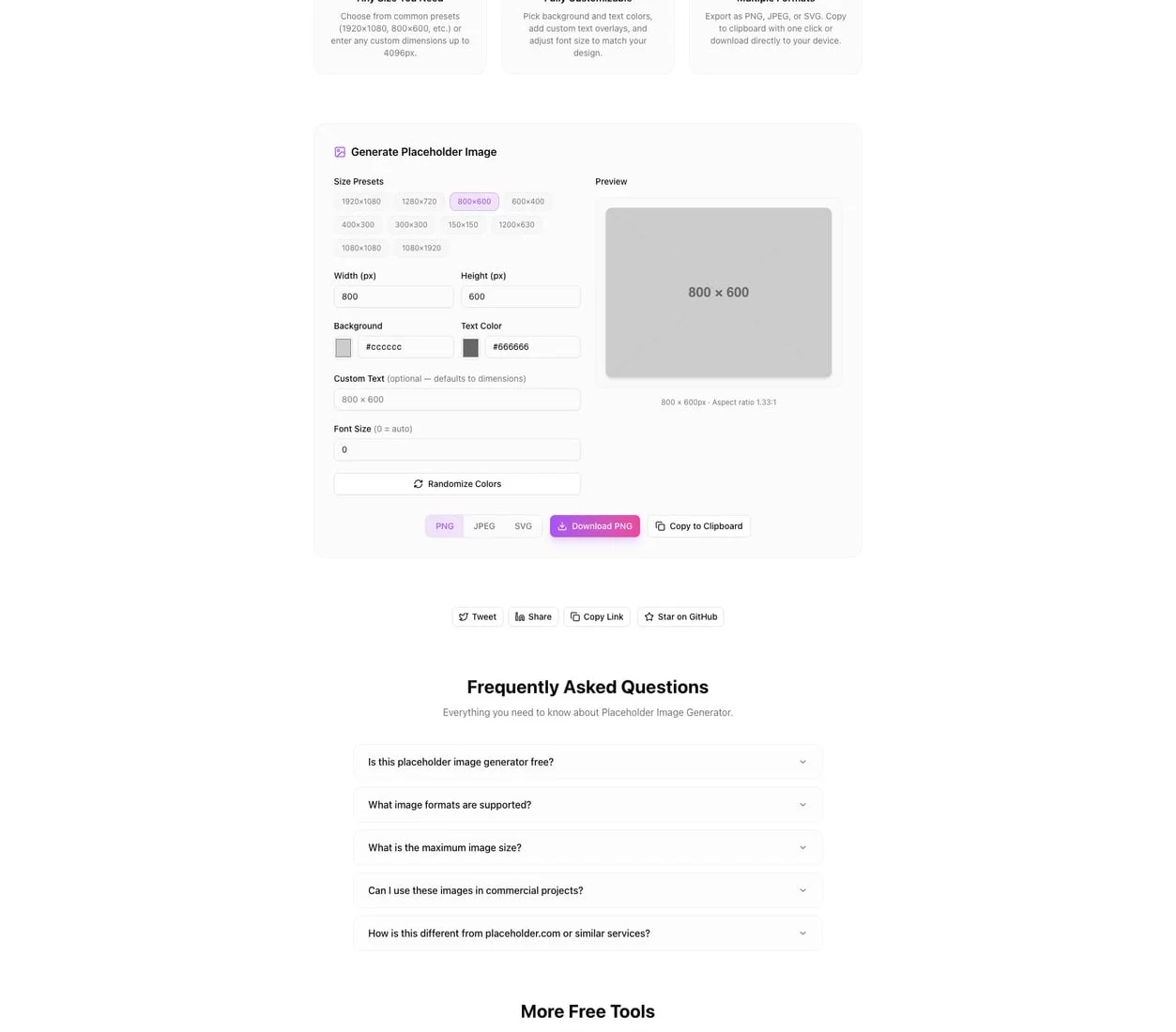
Type the exact pixel dimensions you need. Width and height, no restrictions. Need a social media cover at 1200×630? A mobile splash screen at 1080×1920? A tiny favicon placeholder at 32×32? Just type the numbers.
Presets are available for common sizes—social media headers, app store screenshots, standard web banner dimensions—but you're never locked into them. Custom dimensions are the default.
Pick Your Colors
Choose a background color and a text color using the full color picker or by entering hex codes directly. The live preview updates as you adjust, so you can match your design system's color palette exactly.
This is the feature that separates a purpose-built tool from a URL-parameter service. You're not trying to encode #2563EB into a URL path and hoping the service parses it correctly. You pick the color, you see the color, you get the color.
Add Descriptive Text
By default, the generated image shows its dimensions—"600 × 400"—which is useful for development. But you can override this with any text: "Hero Banner," "User Avatar," "Product Thumbnail," "Team Photo (16:9)."
This turns placeholder images into documentation. A wireframe full of labeled placeholders tells the entire content story without a separate spec document. Stakeholders see "Hero Banner" and understand. Developers see "Product Thumbnail — 300×300" and know the requirements.
Export in the Format You Need
Download your placeholder as:
- PNG — lossless quality, ideal for mockups and presentations
- JPEG — smaller file size, good for quick development and email mockups
- SVG — vector format that scales to any size, perfect for responsive design systems
- WebP — modern compression for web projects optimizing for performance
Different formats for different stages of the project. SVG for design system documentation. PNG for client presentations. WebP for the actual development build. JPEG for quick Slack messages showing layout progress.
Real Workflows Where This Saves Time
The Frontend Developer Building a Component Library
You're creating a card component that accepts an image prop. You need to test it at five different aspect ratios to make sure the layout handles each one gracefully. With an external service, you'd construct five different URLs and check that each one loads. With the Placeholder Image Generator, you create five images locally in 30 seconds. They load instantly from your dev server. They work offline. They have labels that match your test case names.
The Designer Presenting a Wireframe
Your wireframe has 14 image placeholders. Each one should be labeled—"Logo," "Hero Image," "Feature 1 Illustration," "Testimonial Photo"—and they should all use the brand's light grey (#F3F4F6) with the brand's dark grey text (#374151). No placeholder service gives you this level of control via URL parameters. But downloading 14 custom images takes less than two minutes in the generator.
The Project Manager Writing a Requirements Doc
You're documenting the image requirements for a new page. Instead of writing "hero image should be 1440×600 pixels," you generate the actual placeholder at those dimensions, labeled "Hero Image — 1440×600," and embed it in the doc. The requirement is visual, unambiguous, and impossible to misinterpret.
The QA Engineer Testing Image Handling
You need to test how the application handles images at various dimensions—extremely wide, extremely tall, tiny thumbnails, oversized uploads. Generate test images at specific dimensions: 5000×100, 100×5000, 10×10, 4096×4096. Each one is labeled with its dimensions. Run your test suite against actual files instead of relying on external URLs that might not support extreme dimensions.
The Startup Founder Prototyping an MVP
You're building the first version of your product. Real content doesn't exist yet. You need the prototype to look intentional, not broken. Brand-colored placeholders with descriptive labels make your MVP look like a product that's waiting for content—not a product that's missing content.
Privacy and Performance
The Placeholder Image Generator runs entirely in your browser. All image generation happens client-side using the Canvas API. No image data, dimensions, text, or colors are sent to any server. There's no account system, no analytics on your generated images, no tracking.
The tool loads as a static Next.js application. Once loaded, it works offline. Open it, generate your images, download them, close the tab. Your placeholder workflow stays local.
The Bottom Line
Placeholder images are a small part of any project—but they touch every stage. Wireframes, prototypes, mockups, development, testing, presentations. A tool that makes placeholder generation fast, customizable, and independent of external services removes a tiny friction point that you hit dozens of times per project.
Stop depending on third-party placeholder URLs. Stop opening Figma to create rectangles. Generate exactly what you need in seconds.
👉 placeholder-image-generator.tools.jagodana.com
Placeholder Image Generator is part of the 365 Tools Challenge—a new free developer tool every day from Jagodana Studio.