URL Encoder Decoder: Free Online Tool to Encode & Decode URLs Instantly
Free online URL Encoder Decoder — encode and decode URLs with encodeURIComponent and encodeURI modes, batch process multiple strings, and reference common percent-encoded characters. 100% client-side, no signup.
URL Encoder Decoder: Free Online Tool to Encode & Decode URLs Instantly
You're building an API. A query parameter has an email address in it. Or a callback URL. Or a search term with spaces and ampersands. You need to percent-encode it — but which function? encodeURI or encodeURIComponent? And is + the same as %20?
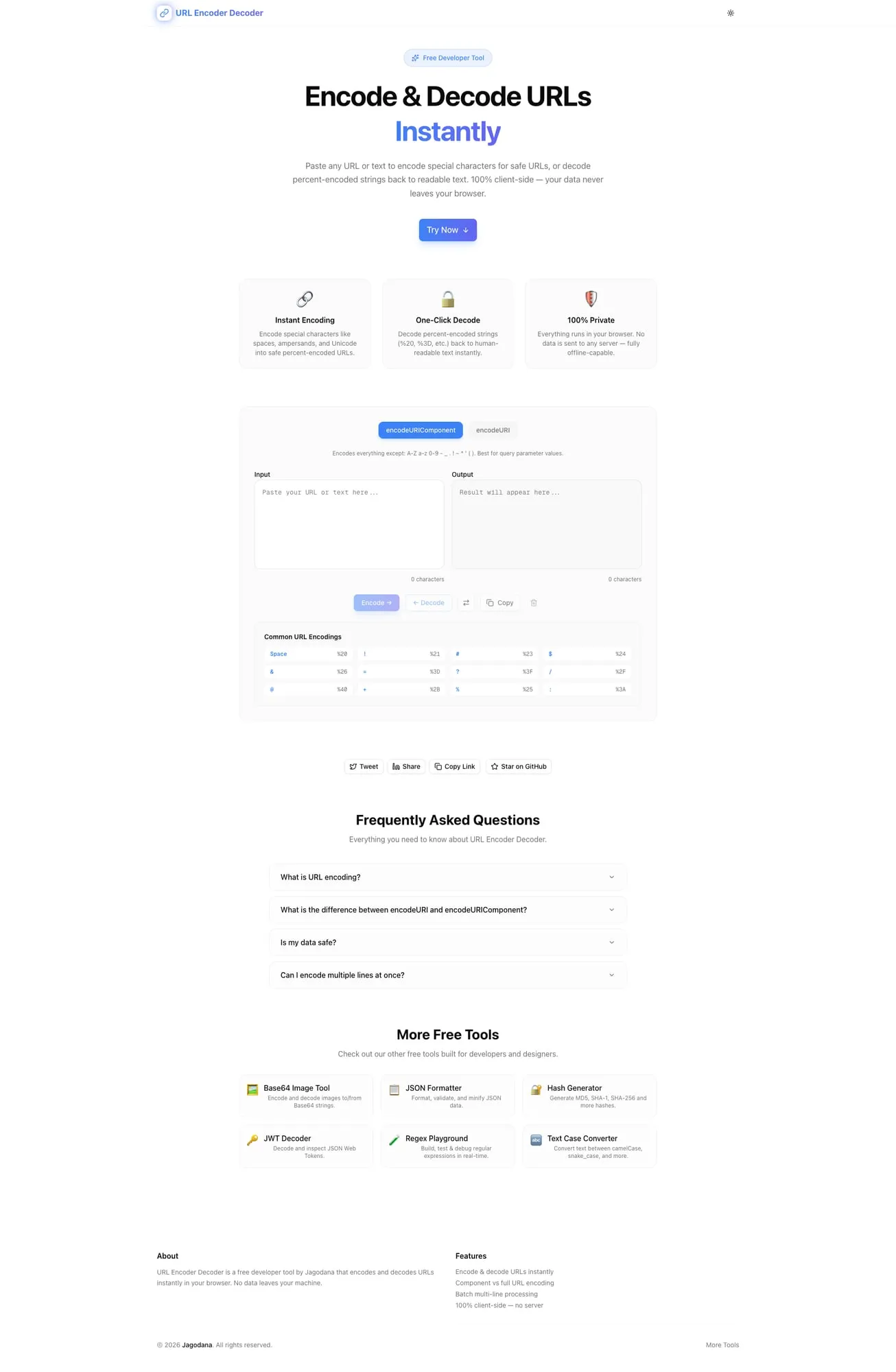
The URL Encoder Decoder at url-encoder-decoder.tools.jagodana.com handles all of this: paste a string, pick your encoding mode, get the result instantly. Batch encode multiple strings. Reference common encodings. Everything runs in your browser — your data never leaves the page.
What Is URL Encoding and Why Does It Matter?
URL encoding (also called percent-encoding) replaces unsafe characters in a URL with a % followed by two hexadecimal digits. It exists because URLs can only contain a limited set of ASCII characters. Everything else — spaces, special characters, non-ASCII text — must be encoded.
Here's the thing most developers get wrong: there are two different levels of encoding, and using the wrong one breaks things silently.
encodeURIComponent vs encodeURI
This is the distinction that causes 90% of URL encoding bugs:
encodeURIComponent encodes everything except A-Z a-z 0-9 - _ . ! ~ * ' ( ). Use it when encoding a value that will be placed inside a URL:
Input:  https://example.com/callback?token=abc123
Output: https%3A%2F%2Fexample.com%2Fcallback%3Ftoken%3Dabc123
This is correct when the entire URL is a parameter value (like a redirect URI in an OAuth flow).
encodeURI encodes less aggressively, preserving :, /, ?, #, &, =, and other URL-structural characters. Use it when encoding a complete URL where the structure should remain intact:
Input:  https://example.com/search?q=hello world&lang=en
Output: https://example.com/search?q=hello%20world&lang=en
The slashes, colons, question mark, and ampersand are preserved. Only the space gets encoded.
The rule: If you're encoding a value to embed in a URL, use encodeURIComponent. If you're encoding a full URL that might have spaces or non-ASCII characters, use encodeURI.
Common URL Encoding Issues (and How to Fix Them)
The Space Problem: %20 vs +
In URL encoding, a space becomes %20. But in form data (application/x-www-form-urlencoded), a space becomes +. They're not interchangeable.
| Context | Space Encoding | Standard |
|---------|---------------|----------|
| URL path/query | %20 | RFC 3986 |
| Form submission | + | HTML spec |
| Both accepted | %20 and + | Most servers |
If your API is strict about which it accepts, you need to know which one you're sending. URL Encoder Decoder uses standard %20 encoding (via encodeURIComponent), which is correct for URL query parameters.
Double Encoding
One of the most common bugs: encoding a string that's already encoded.
Original:     hello world
First encode: hello%20world
Double encode: hello%2520world  ← broken
That %2520 happens because the % in %20 gets re-encoded to %25. The server receives hello%20world instead of hello world, and your search returns zero results.
How to avoid it: Always decode first, then encode. URL Encoder Decoder makes this easy — paste the potentially-encoded string into the decoder, verify the raw value, then encode it fresh.
Encoding Non-ASCII Characters
URLs with non-ASCII characters (accented letters, CJK characters, emoji) need proper encoding:
Input:  café
Output: caf%C3%A9
JavaScript's encodeURIComponent handles UTF-8 encoding automatically, converting multi-byte characters to the correct percent-encoded sequence. URL Encoder Decoder uses native browser encoding, so you get correct UTF-8 encoding every time.
Real-World URL Encoding Scenarios
OAuth Redirect URIs
OAuth 2.0 requires that redirect URIs be exactly encoded. A mismatch between the registered redirect URI and the one in the authorization request causes the flow to fail.
Registered: https://app.example.com/auth/callback
In request: redirect_uri=https%3A%2F%2Fapp.example.com%2Fauth%2Fcallback
Use encodeURIComponent on the full callback URL. URL Encoder Decoder shows you exactly what the encoded result looks like before you drop it into your OAuth config.
API Query Parameters with Special Characters
You're searching for C++ developer via an API:
Wrong: /api/search?q=C++ developer     (+ is interpreted as space)
Right: /api/search?q=C%2B%2B%20developer
The + in C++ must be encoded to %2B, otherwise the server interprets it as C developer (with two spaces).
Webhook Callback URLs
You're registering a webhook that includes query parameters:
Callback: https://api.example.com/webhooks?source=stripe&event=payment
Encoded:  https%3A%2F%2Fapi.example.com%2Fwebhooks%3Fsource%3Dstripe%26event%3Dpayment
If the webhook provider expects the callback URL as a POST body parameter, the entire URL needs encodeURIComponent encoding.
Parsing URLs from Server Logs
Your Nginx access log shows:
GET /search?q=machine%20learning%20%26%20AI HTTP/1.1
What was the actual search query? Paste machine%20learning%20%26%20AI into the decoder:
machine learning & AI
With batch mode, you can decode hundreds of log entries at once.
Common Percent-Encoded Characters Reference
Here's a quick reference for the characters you'll encounter most often:
| Character | Encoded | Why It's Encoded |
|-----------|---------|------------------|
| Space | %20 | Not allowed in URLs |
| ! | %21 | Reserved in some contexts |
| # | %23 | Fragment identifier |
| $ | %24 | Reserved |
| % | %25 | Encoding escape character |
| & | %26 | Query parameter separator |
| + | %2B | Often interpreted as space |
| / | %2F | Path separator |
| : | %3A | Scheme separator |
| = | %3D | Key-value separator |
| ? | %3F | Query string start |
| @ | %40 | User info separator |
Bookmark this or use URL Encoder Decoder's built-in reference table — it's always visible alongside the encoding tool.
How to Use URL Encoder Decoder
Encoding a Single String
- Open url-encoder-decoder.tools.jagodana.com
- Select Encode mode
- Choose
encodeURIComponent(for values) orencodeURI(for full URLs) - Paste your string
- Copy the encoded result with one click
Decoding a Percent-Encoded String
- Select Decode mode
- Paste the encoded string (e.g.,
hello%20world%26foo%3Dbar) - See the decoded result instantly
Batch Processing
- Paste multiple strings, one per line
- Each line is encoded/decoded independently
- Copy all results at once
This is especially useful for processing redirect URIs, API endpoints, or log file URLs in bulk.
URL Encoding in Different Programming Languages
For reference, here's how URL encoding works across common languages:
JavaScript:
encodeURIComponent("hello world") // "hello%20world"
encodeURI("https://example.com/hello world") // "https://example.com/hello%20world"
Python:
from urllib.parse import quote, quote_plus
quote("hello world")       # "hello%20world"
quote_plus("hello world")  # "hello+world"
PHP:
urlencode("hello world")    // "hello+world"
rawurlencode("hello world") // "hello%20world"
Go:
url.QueryEscape("hello world")  // "hello+world"
url.PathEscape("hello world")   // "hello%20world"
Note the inconsistency: Python's quote_plus and PHP's urlencode use + for spaces (form encoding), while quote and rawurlencode use %20 (URL encoding). URL Encoder Decoder uses the standard %20 form, matching JavaScript's encodeURIComponent.
Why Developers Use URL Encoder Decoder
No install, no signup — It's a URL. Open it and encode.
Mode clarity — Most online tools don't tell you which encoding function they use. This one explicitly offers both encodeURIComponent and encodeURI and explains when to use each.
Batch processing — Encode or decode dozens of strings at once without writing a script.
Client-side only — Your URLs, tokens, and API keys never leave your browser. No server-side processing, no logging, no data retention.
Reference table — Common encodings are always visible. No tab-switching to look up what %3F means.
Try URL Encoder Decoder
Stop opening browser consoles to encode URLs. Stop guessing whether to use encodeURI or encodeURIComponent.
It's free, instant, and works on any device. Bookmark it — you'll use it more than you think.
Built by Jagodana Studio — we build developer tools that remove friction from everyday workflows.