CSS Specificity Calculator: Compare Selectors, Debug Overrides & Understand the Cascade
Free online CSS specificity calculator — compute selector specificity in real time, compare multiple selectors visually, and get per-part breakdowns. No signup required.
CSS Specificity Calculator: Compare Selectors, Debug Overrides & Understand the Cascade
You write a CSS rule. It should work. It doesn't. The element stubbornly keeps its old styles. You add !important. It works—but now you've created a maintenance nightmare.
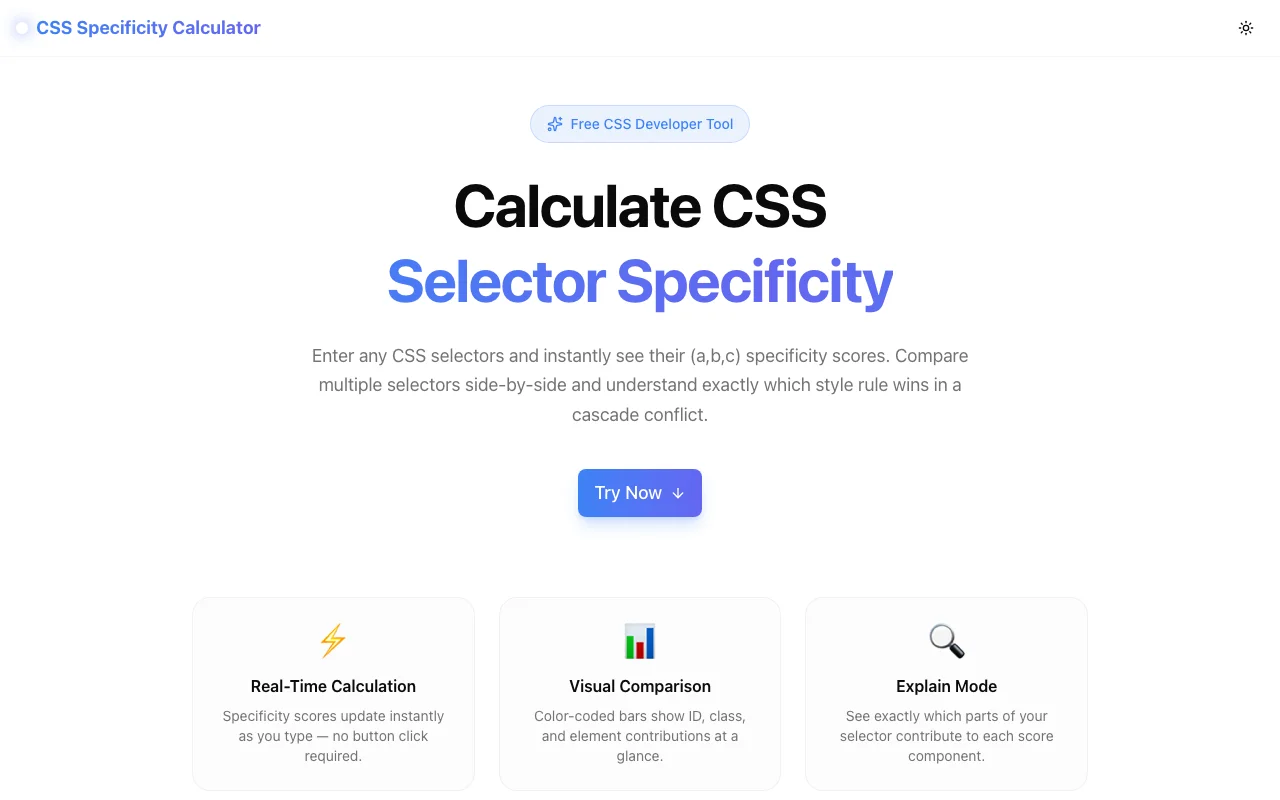
The root cause is almost always CSS specificity—the cascade's tiebreaker that decides which rule wins when multiple selectors target the same element. The CSS Specificity Calculator at css-specificity-calculator.tools.jagodana.com lets you paste any selector, see its specificity score instantly, compare multiple selectors side by side, and understand exactly why one rule overrides another.
What Is CSS Specificity?
CSS specificity is the algorithm browsers use to decide which CSS declaration applies when multiple rules match the same element. Every selector gets a score based on the types of selectors it contains:
- ID selectors (
#header,#sidebar) — the heaviest weight - Class selectors, attribute selectors, and pseudo-classes (
.active,[href],:hover) — medium weight - Element selectors and pseudo-elements (
div,p,::before) — lightest weight
The specificity is usually written as (a, b, c) where:
- a = number of ID selectors
- b = number of class selectors, attribute selectors, and pseudo-classes
- c = number of element selectors and pseudo-elements
A selector with specificity (1, 0, 0) always beats (0, 15, 0). IDs outweigh any number of classes. Classes outweigh any number of elements.
Why Specificity Matters More Than You Think
The !important Trap
When styles don't apply, the temptation is to reach for !important. It works in the moment—but it breaks the cascade. Now the only way to override that rule is with another !important on a more specific selector. This escalation is one of the most common causes of unmaintainable CSS.
Understanding specificity lets you solve conflicts the right way: by adjusting selector weight instead of breaking the cascade.
Hidden Conflicts in Large Codebases
In small projects, specificity conflicts are rare. In real-world applications with hundreds of CSS files, component libraries, and third-party styles, conflicts are inevitable. A utility class gets overridden by a component style. A theme variable loses to an inline style from a library. Without understanding specificity, these bugs feel random.
The Mental Math Problem
Consider this selector:
#main .sidebar ul.nav > li.active:first-child a:hoverQuick—what's the specificity? If you had to count manually: 1 ID, 4 classes/pseudo-classes, 3 elements = (1, 4, 3). Now compare that against three other selectors targeting the same element. That's where manual counting breaks down and a calculator saves real time.
How the CSS Specificity Calculator Works
Real-Time Calculation
Type or paste a CSS selector. The tool computes the (a, b, c) score as you type—no "calculate" button, no page reload. Each component is color-coded:
- Red for IDs
- Blue for classes, attributes, and pseudo-classes
- Green for elements and pseudo-elements
Multi-Selector Comparison
Add as many selectors as you need. The tool displays them in a list with visual bars showing relative specificity. The selector with the highest score gets a trophy badge, so you can answer "which rule wins?" at a glance.
This is particularly useful when debugging conflicts between:
- A component's scoped styles and a global stylesheet
- A CSS framework's utility classes and custom overrides
- Inherited styles and element-specific rules
Explain Mode
Click the info icon on any selector to see a per-part breakdown. The tool maps each token in the selector to its specificity contribution:
#nav        → ID +1
.menu       → Class +1
li          → Element +1
:hover      → Class +1
This turns an abstract score into a concrete explanation. You can see exactly which part of a selector is driving the weight—and which part to change if you need to adjust it.
Quick Examples
Not sure where to start? The tool includes pre-loaded example selectors covering common patterns:
- Simple selectors (
div,.class,#id) - Compound selectors (
div.class#id) - Complex selectors with combinators and pseudo-classes
- Edge cases like
:not(),:is(), and::before
Quick Reference Table
A reference table at the bottom summarizes the specificity rules without requiring you to leave the page. Useful as a refresher while you're actively debugging.
Common Specificity Scenarios
Scenario 1: Class vs. Element
/* Specificity: (0, 1, 0) */
.button { background: blue; }

/* Specificity: (0, 0, 1) */
button { background: red; }
The class selector wins. Even though button is more "specific" in plain English, .button has higher CSS specificity.
Scenario 2: ID vs. Multiple Classes
/* Specificity: (1, 0, 0) */
#submit { color: white; }

/* Specificity: (0, 3, 0) */
.form .actions .button { color: black; }
The ID selector wins. A single ID outweighs any number of classes—this is the most common source of unexpected overrides in projects that mix ID and class selectors.
Scenario 3: Pseudo-Classes in the Mix
/* Specificity: (0, 2, 1) */
a.link:hover { color: red; }

/* Specificity: (0, 1, 2) */
nav a:visited { color: purple; }
The first selector wins. :hover and .link both count as class-level selectors, giving it two in the b column vs. one.
Scenario 4: The :not() Gotcha
/* Specificity: (0, 1, 1) — :not() itself adds zero, but .active inside counts */
p:not(.active) { opacity: 0.5; }
The :not() pseudo-class doesn't add specificity on its own—but its argument does. This trips up even experienced developers. The calculator handles this correctly and explain mode shows exactly what's happening.
Use Cases
Debugging "Why Isn't My CSS Working?"
The most common use case. Your rule isn't applying, and you suspect a specificity conflict. Paste both the expected and actual winning selectors into the calculator, compare scores, and see which one wins—and why.
Code Reviews
Reviewing a PR that adds new CSS? Compare the new selectors against existing ones to catch potential conflicts before they reach production. This is especially valuable in teams with shared stylesheets.
Refactoring Legacy CSS
Working with a codebase full of deeply nested selectors and !important flags? Use the calculator to map out the specificity landscape. Understand which selectors are safe to simplify and which would break if flattened.
Teaching & Learning
If you're learning CSS or teaching it, the explain mode makes specificity visual and concrete. Instead of memorizing rules from a table, see how real selectors are scored.
Interview Preparation
CSS specificity is a common frontend interview topic. Use the tool to practice—type in selectors, predict the score, then verify.
Technical Details
The CSS Specificity Calculator is built with:
- Next.js and TypeScript for a fast, type-safe codebase
- TailwindCSS for styling
- Client-side selector parsing — all calculation happens in your browser
- No external API calls — your selectors never leave your machine
- Google Analytics for anonymous usage tracking
The tool runs entirely in the browser. There's no backend, no database, no account system. Load the page and start calculating.
Try It Now
Stop guessing which CSS rule wins. Stop reaching for !important. Understand specificity in seconds.
👉 css-specificity-calculator.tools.jagodana.com
Paste your selectors, compare the scores, and debug with confidence.
CSS Specificity Calculator is part of the 365 Tools Challenge—a new free developer tool every day from Jagodana Studio.