CSS Selector Tester: Test & Debug CSS Selectors in Real-Time (Free Tool)
Free browser-based CSS selector tester — paste your HTML, type a selector, and see which elements match instantly. Debug class, ID, attribute, pseudo-class, and combinator selectors without leaving the browser.
CSS Selector Tester: Debug Any CSS Selector in Seconds
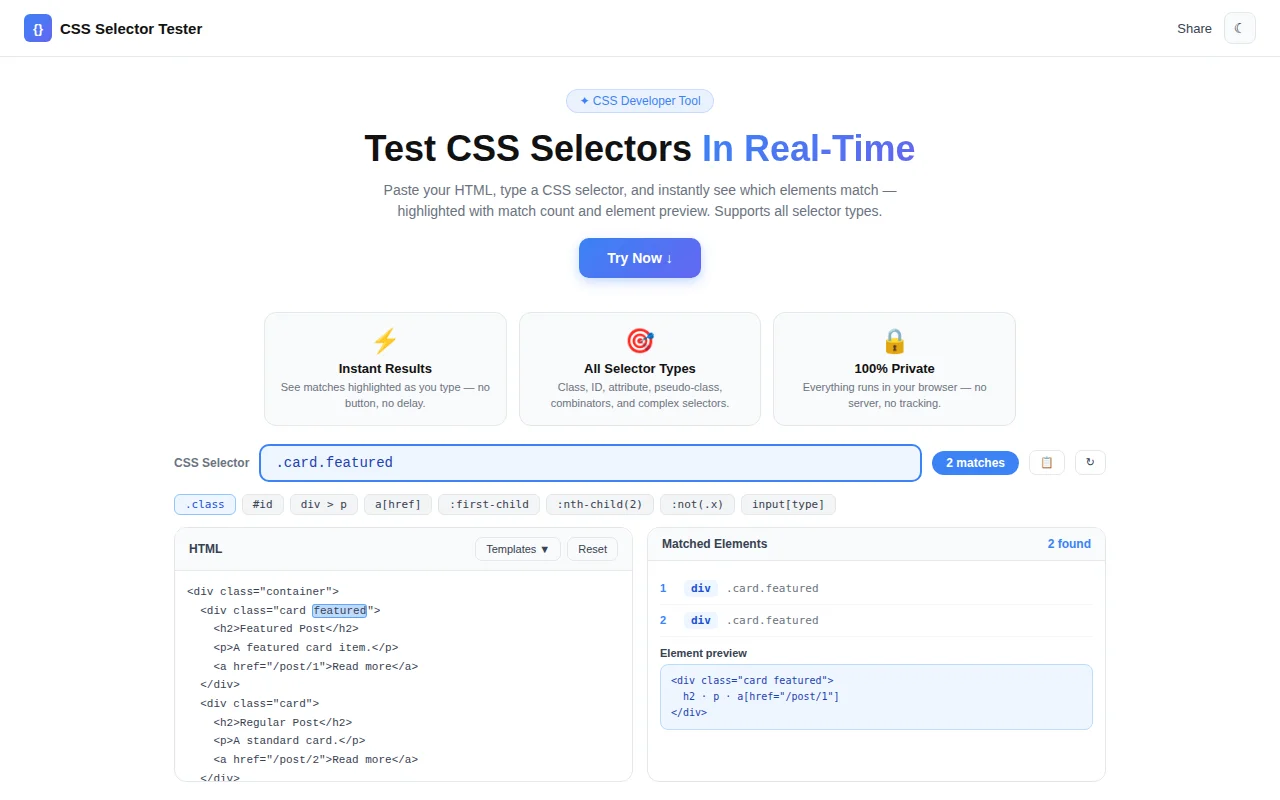
CSS selectors are the foundation of every stylesheet. They're also one of the most common sources of bugs: a selector that looks correct selects the wrong elements, or nothing at all. The CSS Selector Tester fixes that feedback loop — paste HTML, type a selector, see matches highlighted instantly.
No DevTools context-switching. No page reloads. No server. Everything runs in your browser.
What Is a CSS Selector?
A CSS selector is a pattern that tells the browser which HTML elements to style or target. The full CSS Selectors Level 4 specification covers:
| Selector type | Syntax | Selects |
|---|---|---|
| Element | div | All <div> elements |
| Class | .card | Elements with class card |
| ID | #header | The element with id header |
| Attribute | [type="email"] | Inputs of type email |
| Pseudo-class | :first-child | First child of its parent |
| Child combinator | nav > a | <a> elements directly inside <nav> |
| Descendant | form input | Inputs anywhere inside a form |
| Adjacent sibling | label + input | Input immediately after a label |
Selectors can be chained and combined: .card:not(.disabled) > .card-title is valid and targets .card-title elements inside non-disabled cards.
Why Is CSS Selector Debugging Hard?
The DevTools Loop Is Slow
The most common way to test a selector is document.querySelectorAll() in the browser console. This works — but only on the live page. You have to navigate to the right page, open DevTools, switch to Console, type the selector, and read the NodeList output. For each iteration.
Selectors Break Across Context
A selector that works in one component fails in another because the DOM structure differs. Without a quick way to test against a specific HTML snippet, you're left guessing.
Pseudo-Classes Are Invisible
:first-child, :nth-child(2n+1), :not(.active) — these depend on position and class state at evaluation time. In DevTools, you can't easily swap HTML structure to see how the selector behaves against different arrangements.
How to Use the CSS Selector Tester
Step 1: Enter Your HTML
Paste any HTML fragment into the left editor panel. The tool ships with four templates to start immediately:
- Navigation — a
<nav>with links and active states - Article — an article with headings, paragraphs, and a list
- Form — a login form with labeled inputs
- Cards — a grid of cards with varying classes
Step 2: Type a CSS Selector
Enter any selector in the input field at the top. Start simple:
.nav-linkThen try more specific patterns:
nav > a:not(.active)[data-id="2"]li:nth-child(odd)The match count badge updates as you type. A descriptive error message appears for invalid syntax — no cryptic console errors.
Step 3: Read the Results
The right panel lists every matched element with:
- Tag name —
<li>,<a>,<input> - ID —
#email,#login-form - Class list —
.nav-link,.active,.btn-primary - Text preview — first 60 characters of text content
The HTML preview section highlights matched elements with a blue outline so you can see exactly which nodes are selected in the original markup.
Which CSS Selectors Can I Test?
The tool uses the browser's native querySelectorAll() under the hood, so it supports everything the browser supports:
Basic Selectors
/* Element */
li

/* Class */
.item

/* ID */
#email

/* Universal */
*
Attribute Selectors
/* Has attribute */
[required]

/* Exact match */
[type="email"]

/* Starts with */
[href^="https"]

/* Ends with */
[src$=".jpg"]

/* Contains */
[class*="btn"]
Combinators
/* Descendant (space) */
form input

/* Child (>) */
nav > a

/* Adjacent sibling (+) */
label + input

/* General sibling (~) */
h2 ~ p
Pseudo-classes
:first-child
:last-child
:nth-child(2)
:nth-child(odd)
:nth-child(2n+1)
:not(.disabled)
:not([type="submit"])
:empty
:only-child
Complex combinations
.card:not(.disabled) > .card-title

ul.list > li:first-child

form input[type="text"]:not([disabled])
Note on interaction pseudo-classes:
:hover,:focus,:active, and:visiteddepend on live user interaction or browser history. They cannot be statically evaluated — the tester correctly shows no matches for these.
What Is querySelectorAll() and Why Does It Matter?
querySelectorAll() is the browser DOM API that powers both CSS selector matching and JavaScript element queries. When you write:
document.querySelectorAll('.card:not(.disabled)')The browser uses the same selector engine as CSS. This tool evaluates your selector through the same querySelectorAll() call — which means: if it works here, it will work in your CSS and JavaScript.
Practical Use Cases for Frontend Developers
Debugging a CSS Rule That Isn't Applying
Your .nav > a.active rule isn't matching. Paste the nav HTML, type the selector, and see immediately whether zero elements match — or whether a different element is getting selected instead. Often the fix is obvious once you can see the match visually.
Writing querySelector for JavaScript
You're writing a function that needs to find all form fields that are both required and empty. Test :required:placeholder-shown or [required]:not([value]) against a form snippet before embedding it in code.
Learning Selector Specificity
Students learning CSS often struggle with why one rule overrides another. This tool makes selector targeting concrete: type a selector, see exactly which elements it picks. Change the selector, see the results change. It's faster than reading documentation.
Code Review
A PR adds a new CSS rule with a non-obvious selector. Paste the relevant template HTML, enter the selector, and verify it targets exactly the intended elements before merging.
Frequently Asked Questions
Does my HTML get sent to a server?
No. The CSS Selector Tester runs entirely in the browser. Your HTML is parsed in memory using DOMParser and evaluated with querySelectorAll(). Nothing is sent to any server.
Why doesn't :hover match any elements?
Interaction pseudo-classes (:hover, :focus, :active) require the element to be in that interaction state. Since the tool evaluates selectors statically — not against a live rendered page — these pseudo-classes always return zero matches. Structural pseudo-classes (:first-child, :nth-child(), :not()) work correctly.
What's the difference between div p and div > p?
div p (descendant combinator) matches any <p> anywhere inside a <div>, regardless of nesting depth. div > p (child combinator) matches only <p> elements that are direct children of a <div> — one level deep only. The tester makes this distinction immediately visible.
Can I test selectors for Shadow DOM?
No. Shadow DOM elements are isolated from the main document tree and cannot be reached by querySelectorAll() from outside the shadow root. This is a browser limitation, not a tool limitation.
The CSS Selector Tester is part of the 365 Tools Challenge — one free developer tool shipped every day. Built in under 2 hours with Next.js, TypeScript, and the browser's native DOM API.