Introducing HTML to Markdown Converter: Paste HTML, Get Clean Markdown Instantly
A free, browser-based tool that converts any HTML into clean Markdown in real time. No login, no server, no library installs — paste HTML, copy Markdown, done.
Introducing HTML to Markdown Converter: Paste HTML, Get Clean Markdown Instantly
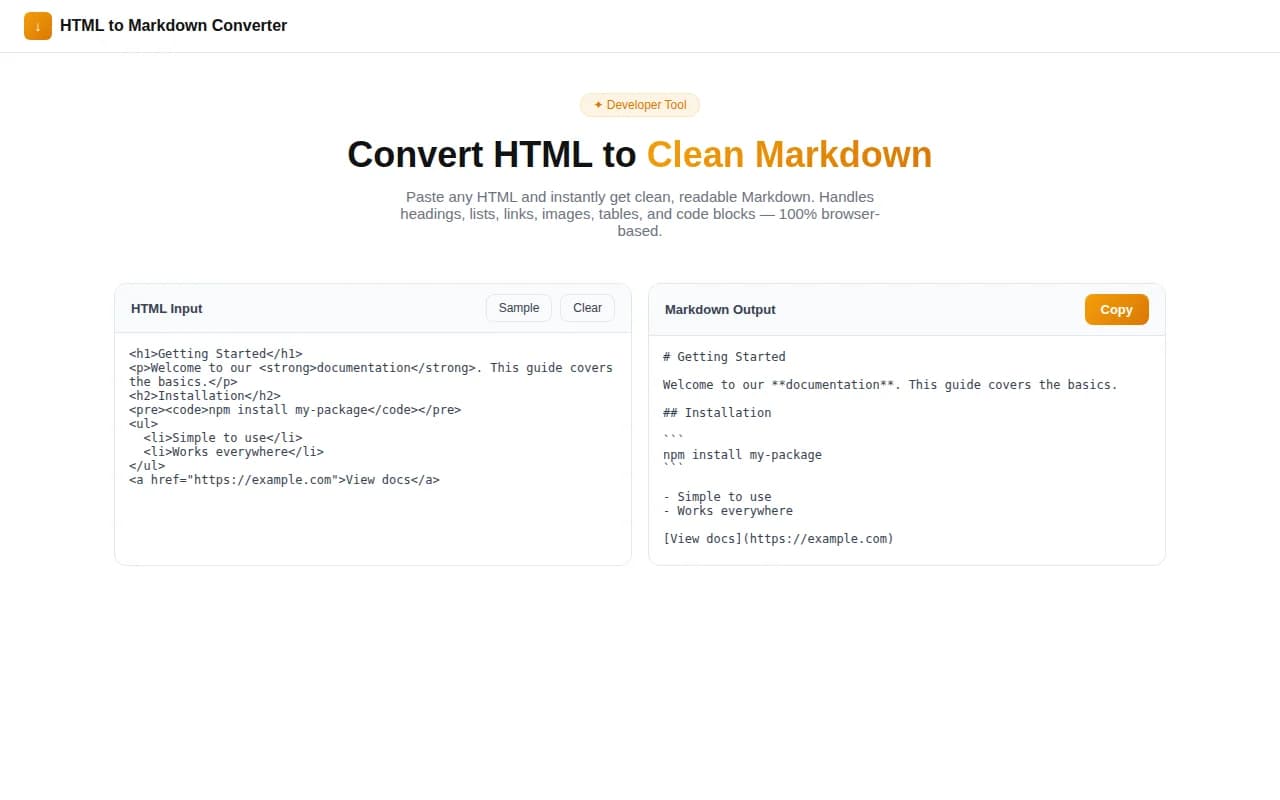
We shipped a free HTML-to-Markdown converter. Paste any HTML — a snippet, a blog post, a full page source — and get clean, readable Markdown in real time. No button click. No login. No server. All conversion happens in your browser.
→ html-to-markdown-converter.tools.jagodana.com
What Is an HTML to Markdown Converter?
An HTML to Markdown converter transforms HTML markup into Markdown syntax. Instead of <h2>Features</h2>, you get ## Features. Instead of <a href="https://example.com">Click here</a>, you get [Click here](https://example.com).
Markdown is lighter, more portable, and more readable than HTML. It renders correctly in GitHub, GitLab, Notion, Obsidian, most static site generators, and documentation platforms. When you have content locked in HTML format, converting it to Markdown makes it usable in a much wider range of tools.
Why Does This Tool Exist?
Three scenarios came up constantly in our workflows:
Migrating CMS content. A website running on WordPress, Webflow, or HubSpot stores posts as HTML. Moving to a static site generator — Astro, Gatsby, Hugo, 11ty — requires Markdown files. Converting a hundred posts by hand is not realistic.
Cleaning up rich text editor output. WYSIWYG editors produce bloated HTML — nested <span> tags, inline style attributes, empty <p> elements. Paste that into an HTML-to-Markdown converter and you get the semantic structure back, stripped of the noise.
Preparing content for GitHub. GitHub renders Markdown in issues, pull requests, wikis, and READMEs. If your content exists as HTML — from a design doc, a spec, a brief — you want Markdown without spending ten minutes reformatting it by hand.
The existing solutions all have friction: Pandoc requires installation and CLI flags. Python libraries require a script. Online converters send your content to a server or are buried under ads.
This tool is a browser tab. Open it, paste, copy. Under 30 seconds.
How Does the HTML to Markdown Converter Work?
What happens when I paste HTML?
The converter uses the browser's built-in DOMParser to parse your HTML into a real DOM. It then walks every node in the tree, converting each element to its Markdown equivalent.
<h1>Title</h1> becomes # Title. <strong>Bold</strong> becomes **Bold**. <ul><li>Item</li></ul> becomes - Item. It handles the nesting and whitespace correctly because it is working with a parsed DOM, not running regex against raw HTML strings.
The conversion runs in a React useEffect that fires on every keystroke — so Markdown appears as you type.
What HTML elements are supported?
All common HTML:
| HTML | Markdown |
|------|----------|
| <h1>–<h6> | # through ###### |
| <strong>, <b> | **bold** |
| <em>, <i> | *italic* |
| <del>, <s> | ~~strikethrough~~ |
| <a href="url"> | [text](url) |
| <img src="…" alt="…"> |  |
| <ul> / <ol> / <li> | - / 1. with nested indent |
| <blockquote> | > prefix on every line |
| <code> (inline) | `backtick` |
| <pre><code> | ```language ``` fence |
| <table> | GFM \| cell \| cell \| table |
| <hr> | --- |
| <br> | trailing two-space line break |
Does it work on full HTML pages?
Yes. Paste the entire source of a webpage. The converter automatically strips <script>, <style>, <head>, <noscript>, and other non-content tags. You get a Markdown representation of the visible content only.
What Markdown flavour does it produce?
The output follows CommonMark with GitHub Flavored Markdown extensions. Tables and strikethrough (GFM extensions) are included. The output renders correctly on GitHub, GitLab, Notion, Obsidian, VS Code's Markdown preview, and most Markdown editors.
Is my content sent to a server?
No. All processing runs in the browser. The DOMParser, the recursive node walker, the cleanup pass — everything runs in JavaScript in your browser tab. Nothing is uploaded. Nothing is stored.
Who Should Use an HTML to Markdown Converter?
Developers migrating documentation
When you move a documentation site from a legacy CMS to a Markdown-based system (Docusaurus, MkDocs, GitBook, Nextra), you need to convert hundreds or thousands of HTML pages. This tool handles individual pages. Batch migrations need a script — but this is the fastest way to check output quality and validate conversion logic before writing one.
Technical writers cleaning up editor output
WYSIWYG tools (Google Docs exports, Confluence, Notion HTML exports, WordPress editor) produce HTML that is technically valid but semantically messy. Running it through this converter strips the noise and gives you clean Markdown you can commit.
Developers copying content from web pages
When you find documentation, a tutorial, a specification, or a reference on the web and want to save it in a personal knowledge base or a project wiki, copying the page source and converting it to Markdown is faster than reformatting manually.
Content teams migrating to headless CMS
Moving from a monolithic CMS to a headless one (Contentful, Sanity, Strapi) often means converting stored HTML to a new content format. Markdown is a common intermediate format in these migrations.
What Makes a Good HTML to Markdown Conversion?
Not all converters produce the same quality of output. The differences show up in edge cases.
Tables. HTML tables map to GFM pipe tables. The converter needs to read <thead>, <tbody>, <tr>, <th>, and <td> separately to build correct header rows and separator lines. If the table has no <thead>, the first row should still be treated as a header.
Nested lists. Markdown indentation for nested lists is sensitive. Two spaces of indentation per level. A converter that gets this wrong produces flat lists or broken rendering.
Code blocks with language hints. The fenced code block syntax supports language identifiers: ```javascript. If the HTML has <code class="language-javascript">, a good converter reads that class and produces the language hint in the output.
Full-page HTML. A converter that just tokenizes raw HTML strings without parsing it into a DOM will often produce artifacts — converted <script> tags, style declarations appearing as text, meta tags in the output.
This converter handles all of these correctly because it works on a parsed DOM rather than raw HTML text.
How Did We Build This?
The converter runs entirely in TypeScript with no external dependencies for the conversion logic itself. The core is a recursive convertNode() function:
function convertNode(node: Node): string {
  if (node.nodeType === Node.TEXT_NODE) {
    return (node.textContent ?? "").replace(/\n/g, " ").replace(/\s+/g, " ");
  }
  const el = node as HTMLElement;
  const tag = el.tagName.toLowerCase();
  const children = Array.from(el.childNodes).map(convertNode).join("");

  switch (tag) {
    case "h1": return `\n\n# ${children.trim()}\n\n`;
    case "strong":
    case "b":    return `**${children}**`;
    // ... etc.
  }
}
Tables get a dedicated function that reads the DOM structure and builds correctly formatted GFM pipe tables. Lists track whether they are ordered or unordered and handle nesting with two-space indentation.
The whole conversion runs synchronously in under a millisecond for typical page content. The React useEffect fires it on every input change, so the output updates in real time with no perceived lag.
Use the HTML to Markdown Converter
It is free. It is instant. It does not touch a server. Open it, paste HTML, get Markdown.
html-to-markdown-converter.tools.jagodana.com →
Part of the 365 Tools Challenge — building one free micro-tool for developers and designers every day.