Introducing JSON to GraphQL: Convert Any JSON to a GraphQL Schema in Seconds
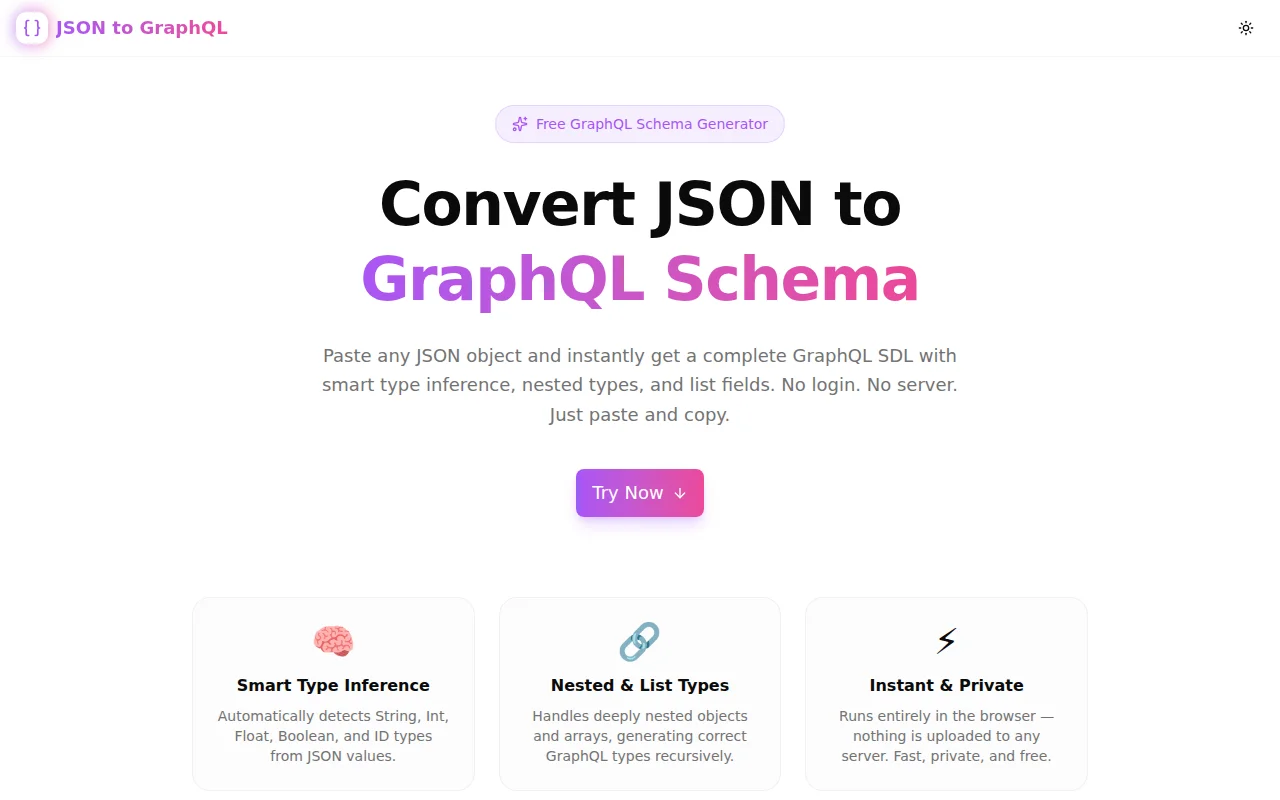
A free online tool that converts any JSON object or array into GraphQL Schema Definition Language (SDL) instantly — smart type inference, nested types, and list fields. No login, no server.
Introducing JSON to GraphQL: Convert Any JSON to a GraphQL Schema in Seconds
We built a free JSON to GraphQL schema converter. Paste any JSON object or array into the left pane, get a complete GraphQL Schema Definition Language (SDL) on the right — with correct scalar types, nested object types, and list fields. Runs entirely in your browser. No account, no install, no latency.
→ json-to-graphql.tools.jagodana.com
What Is GraphQL Schema Definition Language (SDL)?
GraphQL SDL is the syntax used to define a GraphQL schema — the types, fields, and relationships that make up your API. Every GraphQL server starts with a schema, and SDL is the language you write it in:
type User {
  id: ID
  name: String
  age: Int
  isActive: Boolean
}
SDL is human-readable, framework-agnostic, and accepted by every major GraphQL toolchain — from Apollo and Yoga to code generators like GraphQL Code Generator, Pothos, and Nexus.
Why Do Developers Need a JSON to GraphQL Converter?
Most APIs start with data. You have a database table, a REST endpoint response, or a product spec — and the shape of that data is already expressed as JSON. Writing GraphQL SDL by hand from that JSON is mechanical and repetitive:
- 30 fields across 5 nested types = 30 lines of type declarations you already know
- Scalar type guessing is error-prone (is this
IntorFloat? is thisIDorString?) - Nested objects require naming and extracting each type manually
The converter automates all of that. You bring the data shape. The tool generates the schema.
How Does JSON to GraphQL Type Inference Work?
What scalar types are inferred automatically?
The converter maps JSON values to GraphQL scalars using these rules:
| JSON value | Inferred GraphQL type |
|:---|:---|
| true, false | Boolean |
| Integer (e.g. 42, 0) | Int |
| Decimal number (e.g. 9.5, 3.14) | Float |
| String | String |
| Field named id, _id, uuid, guid | ID |
| null or undefined | String (fallback) |
How are nested JSON objects handled?
Every nested object becomes its own named GraphQL type. The name is derived from the field name using PascalCase conversion. The parent type references the nested type by name:
{
  "user": {
    "id": "u_1",
    "profile": { "bio": "Developer", "followers": 1200 }
  }
}
Generates:
type Root {
  user: User
}

type User {
  id: ID
  profile: Profile
}

type Profile {
  bio: String
  followers: Int
}
How are JSON arrays converted to GraphQL list types?
Arrays of scalars produce list scalar types ([String], [Int]). Arrays of objects produce list types referencing the generated named type ([Post]). The converter inspects the first array element to determine the type:
{
  "tags": ["developer", "react"],
  "posts": [{ "id": "p_1", "title": "Hello" }]
}
Generates:
type Root {
  tags: [String]
  posts: [Post]
}

type Post {
  id: ID
  title: String
}
When Should I Use This Tool?
Starting a new GraphQL API
You have a REST API or database and want to migrate to or add GraphQL. Grab a sample response JSON, convert it, and you have a working schema draft to review and extend.
Adding a new type to an existing schema
Your schema is live. You're adding a Notification or Invoice resource. The product spec defines the shape as JSON. Convert it, add descriptions and non-null markers, integrate.
Feeding a code generation pipeline
Tools like GraphQL Code Generator accept SDL as input and produce TypeScript types, React hooks, and resolvers. Start with JSON, generate SDL, run codegen — schema-first workflow in three steps.
Learning GraphQL schema design
If you're new to GraphQL, the SDL syntax is unfamiliar. Converting JSON you already understand into SDL makes the type system concrete. You see exactly how data shapes become type definitions — better than reading docs in isolation.
Rapid API prototyping
You're in a design meeting. Someone pastes a JSON payload in Slack. You need a schema proposal in the next five minutes. Paste, convert, share the SDL. Done.
What Makes This Tool Different?
Fully client-side — your data never leaves your device
Every conversion runs in your browser using JavaScript. There is no server call, no data upload, and no analytics on your input. Your JSON stays on your machine.
Recursive nested type generation
Most simple converters only handle flat objects. This converter recurses through every level of nesting, generating correctly-named types for each object and cross-referencing them in parent types.
ID field detection
Fields named id, _id, uuid, or guid are automatically typed as ID — the correct GraphQL scalar for entity identifiers, not String. This matters for GraphQL client caches (Apollo, Relay) that use the ID type to normalize entities.
Nullable-first output
All generated fields are nullable by default — the idiomatic GraphQL starting point. Making fields non-null is a breaking change in GraphQL; starting nullable keeps your schema flexible. Add ! where your business logic demands it.
How Do I Use the JSON to GraphQL Converter?
Step 1: Paste your JSON
Open json-to-graphql.tools.jagodana.com and paste any valid JSON object or array of objects into the left editor pane.
Step 2: Review the generated SDL
The right pane shows the complete GraphQL SDL instantly — all types, all fields, all correctly-inferred scalar types.
Step 3: Copy and use
Click Copy Schema to copy the SDL to your clipboard. Paste it into your GraphQL project, schema file, or code generator config.
Is the Generated SDL Production-Ready?
The output is a solid starting point, not a finished schema. You'll typically want to:
- Add
!(non-null) markers to required fields - Add field descriptions with
""" ... """ - Add input types for mutations
- Rename auto-generated nested type names if they conflict with existing types
- Add custom scalars (e.g.
DateTime,URL) for appropriate fields
The converter handles the mechanical mapping. The semantic decisions — what's required, what's optional, what needs custom scalars — are yours.
Try It Now
json-to-graphql.tools.jagodana.com
Free. No account. Works in any browser. Your data never leaves your device.
Built as part of the 365 Tools Challenge — one useful tool every day for developers, designers, and product builders.