Stop Guessing Browser Sizes — Introducing ViewPorter
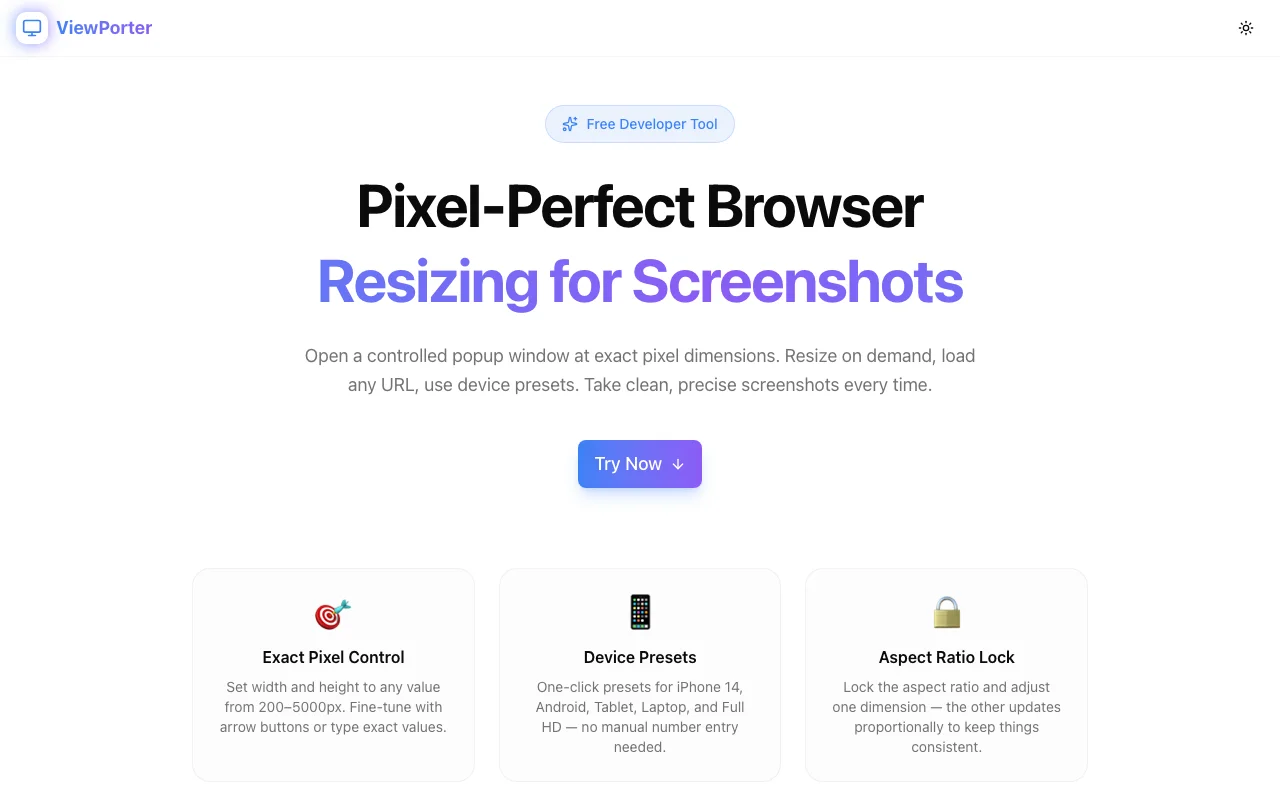
Take pixel-perfect screenshots every time. ViewPorter opens a controlled browser popup at exact pixel dimensions, with device presets, aspect ratio lock, and resize-on-demand — all in your browser, zero install.
Stop Guessing Browser Sizes — Introducing ViewPorter
If you've ever tried to take a pixel-perfect screenshot for a portfolio, a client presentation, or a design handoff, you know the pain. You drag your browser window, squint at the dimensions shown by a screen ruler, and end up with a 1443×902px screenshot when you needed exactly 1440×900. Close enough? Not for portfolios. Not for clients. Not for App Store previews.
ViewPorter fixes this. It's a free, zero-install browser tool that opens a controlled popup window at exact pixel dimensions — then lets you resize it on demand, load any URL inside it, and capture clean, precise screenshots every time.
The Problem with Manual Resizing
Manually resizing a browser window to exact dimensions is surprisingly hard:
- Operating system chrome — Window title bars and OS borders add unpredictable pixel offsets
- Snap zones — Windows and macOS often override your drag to snap to preset positions
- No feedback — Most browsers only show window dimensions if you open DevTools
- Drift — A window that was 1440px wide yesterday may not be today
The result: your "1440×900" screenshot is actually 1437×896, and you can't tell until you open it in Figma.
Enter ViewPorter
ViewPorter is a free tool from the Jagodana suite that solves this with a simple approach: it uses window.open() with explicit width and height parameters to open a controlled popup at exactly the dimensions you specify.
No extensions. No installs. Works in any modern browser.
How It Works
1. Set your dimensions
Enter any width and height between 200–5000px. Fine-tune with arrow buttons or type exact values. A live preview shows the current dimension (e.g. "1440 × 900px").
2. Choose a device preset
One-click presets cover the most common targets:
| Preset | Dimensions | |--------|-----------| | iPhone 14 | 390 × 844 | | iPhone SE | 375 × 667 | | Android | 360 × 800 | | Tablet | 768 × 1024 | | Laptop | 1440 × 900 | | Full HD | 1920 × 1080 |
3. Lock the aspect ratio (optional)
Toggle Aspect Ratio Lock and adjusting one dimension automatically updates the other proportionally. Useful when you need to scale a viewport up or down while keeping the same proportions.
4. Enter a URL
Paste any URL and it loads inside the popup on launch. Leave it blank to open an empty window you can navigate manually — useful when you need to log in first.
5. Open Window
Click Open Window and a precisely-sized popup appears. The Resize button lets you adjust dimensions without closing and reopening — perfect for comparing how a design looks at different breakpoints without losing your scroll position.
6. Take your screenshot
ViewPorter includes a built-in Screenshot Tips section with the techniques that actually work:
- macOS:
Cmd+Shift+4thenSpaceto capture the popup window as a clean, shadow-free image - Windows:
Win+Shift+S→ Window mode - Hide DevTools first before capturing to avoid capturing the inspector panel
- Disable scrollbars via a quick DevTools snippet:
document.documentElement.style.overflow='hidden' - Full-page captures: Use GoFullPage or Fireshot for content beyond the visible viewport
Use Cases
Portfolio screenshots — Every pixel matters when you're showcasing your work. A 1280×800 screenshot looks deliberate. A 1283×797 screenshot looks like you didn't care.
Design QA — Check exactly how your web app behaves at a client's target breakpoint without touching DevTools or guessing.
Device mockups — Need a screenshot at iPhone 14 resolution for an App Store preview or a Dribbble shot? One click.
Responsive testing — Cycle through breakpoints quickly without resizing your main browser window or opening a new DevTools responsive mode.
Client presentations — Show a design in the browser at exactly the dimensions the client will see on their device.
Free, Always
ViewPorter is a free developer tool from Jagodana. No sign-up required, no paid tier, no tracking. It's part of our growing suite of free tools for developers and designers — alongside Screenshot Beautifier, OG Preview, Favicon Generator, Theme Contrast Checker, Regex Playground, and Logo Maker.
Try it at view-porter.jagodana.com.